Group text vs. a job photo app: when your crew chat stops working
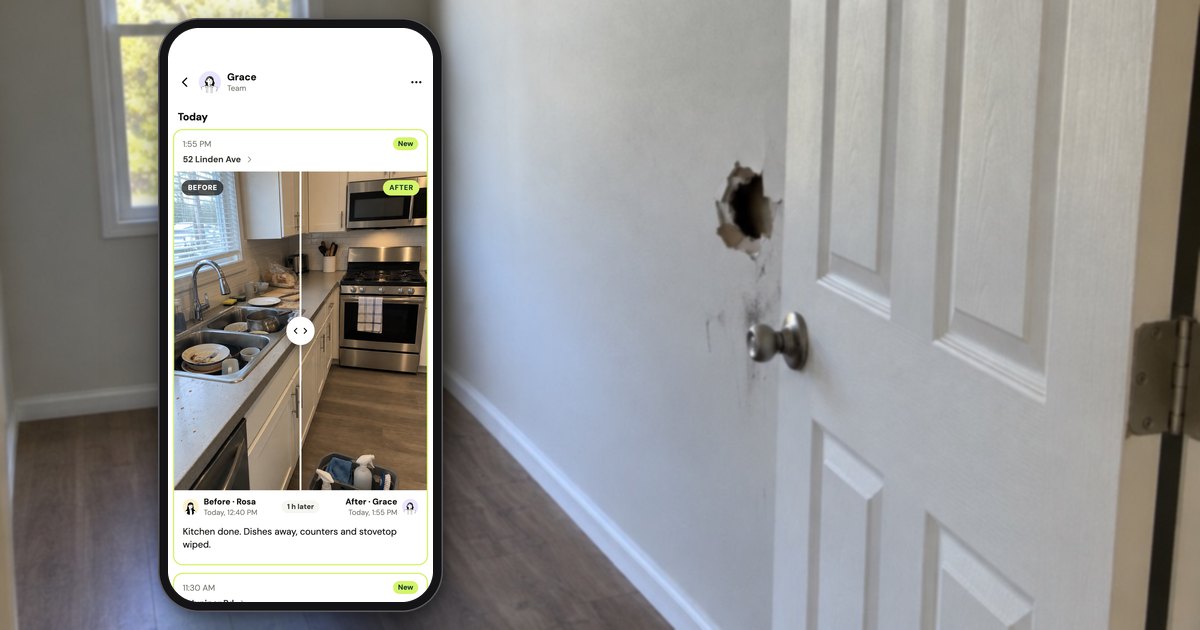
A group text is enough for job photos when the crew is two or three people on the same kind of phone, jobs finish the same day, and nobody asks for the pictures again. It stops working when photos have to be found by job months later, when people join or leave, or when iPhones and Androids share one thread. This page quotes the platforms' own rules, checked October 17, 2026, and says where a job photo app such as Handle (usehandle.app) fits and where it doesn't.
When is a group text enough for job photos?
A group text or a WhatsApp group is enough for job photos when the crew is two or three people, jobs finish the same day, everyone is on the same kind of phone (or everyone uses WhatsApp), and nobody asks for the pictures after the job is paid. It costs nothing extra, and nobody learns a new app.
Some owners run their business this way on purpose. A land services owner described his setup on r/sweatystartup in July 2025:
"We've got group chats, SOPs, systems, and photo updates. That's how I stay in the loop without being on every job."
Others skip even the group chat. One contractor's advice on r/Contractor in January 2026: "you could also just create folders on your phone per job and drop info in there. Especially if you don't need/want to learn yet another tool." A pressure washer's reply in an April 2026 thread on r/pressurewashing: "Pictures. Google drive."
Some reviewers of a paid job photo app agree. When Handle's team read and coded 657 CompanyCam reviews from the App Store, Google Play, Capterra and Facebook in September 2026, 14 of them said, one way or another, that it wasn't worth paying for next to the phone's own photos or a free tool. That sets an honest bar: anything that replaces the group text has to be simpler than the camera roll and a group text, not just have more features.
What do iMessage, WhatsApp and shared albums actually do with a crew's photos?
An iPhone group text can't add someone on an Android phone, a new WhatsApp member gets at most 100 earlier messages and only if someone sends them, and leaving a Google Photos shared album removes everything that person added. All of it is on the vendors' own pages, checked October 17, 2026.
iPhone group texts (Messages)
- Adding people. "You can only add someone to a group message if they use an Apple device and the group message already includes three or more people" (Apple Support, published December 11, 2025, checked October 2026). An owner who has been texting one helper can't add a second person to that conversation; it takes a new group.
- Removing people. "You can only remove someone if the group has four or more people and everyone uses an Apple device" (same page). In a three-person thread, or any thread with one Android phone in it, you can't take the person who quit off the thread, so they can keep getting every job photo.
- Mixed phones. To add someone on a non-Apple phone, "you need to create a new group message. That message will use SMS/MMS/RCS by default" (same page). The new thread starts empty; the old photos stay in the old one.
- Photo size. "If you use SMS or MMS messaging to send photos or videos, your carrier may set size limits for attachments," and the iPhone "can compress photo and video attachments when necessary" (Apple Support, published June 18, 2026, checked October 2026).
Apple's page doesn't say what someone added to an existing iMessage group sees of earlier messages, so this page doesn't either.
WhatsApp groups
- Phones. WhatsApp's Android page says to "Find WhatsApp Messenger in the Google Play Store and tap Install," and WhatsApp Messenger is free in the App Store, both checked October 17, 2026. A mixed crew can share one group.
- New members. When you add someone, Group Message History lets you send them recent messages, "from 25 up to 100 maximum." "Sending message history is an action you have to take," and "admins have the option to disable the setting for their groups" (WhatsApp Blog, February 19, 2026, checked October 2026). WhatsApp wrote that it had started rolling the feature out "gradually."
What 100 messages means for a crew: on a crew that posts 30 messages a day, it's the last three or four days. The before pictures from March aren't in it.
Google Photos shared albums
- Phones. Google's sharing instructions cover iPhone, Android and computer (Google Photos Help, checked October 17, 2026).
- Leaving. "When you leave a shared album, all of the photos, videos, comments, and likes you have added will be removed" (same page).
- Links. "When you share a link to your album, anyone with the link can view the photos and add to the album" (same page). That includes anyone the link was forwarded to.
- Size and storage. An album holds "up to 20,000 photos or videos" (Google Photos Help), and "Each Google Account includes up to 15 GB of storage, which is shared across Gmail, Google Drive, and Google Photos" (Google One Help), both as of October 2026.
iCloud Shared Albums
Apple's limits for shared albums depend on the software version the album was created in (Apple Support, "Shared Albums limits", published September 14, 2026, checked October 2026):
| What Apple's page says | Album created in version 26 or earlier | Album created in version 27 or later |
|---|---|---|
| Photo quality | "reduced to 2048 pixels on the long edge" | Originals, at full resolution |
| Counts toward iCloud storage | No | Yes: the owner's, including what participants add |
| Photos and videos per album | 5,000 | No limit beyond the owner's iCloud storage |
| People | 100 subscribers | 100 participants, including the owner |
Photos stay "until you or the contributor delete them manually, or until you delete the shared album completely." Apple's page is about Apple devices; if part of your crew carries Android phones, check how they would get to the album before you count on it.
What are the signs your crew chat has stopped working?
A crew chat has stopped working for photos when they land on the wrong job, a customer asks for pictures nobody can find, a new hire can't see the history, someone who quit takes their photos or stays on the thread, or people mute it. One sign is a nuisance; two or more mean the photos need a place sorted by job.
Under each of the five signs below: the platform rule behind it, then what a job photo app does instead, with Handle as the labelled example. Other job photo apps solve the same problems their own way.
1. Photos end up on the wrong job, or the wrong house
"Sends me photos of another house," an electrician wrote about a project manager on r/electricians in November 2025. In a chat, a photo carries who sent it and when it was sent. Which job it belongs to is whatever someone typed next to it, if anything. With two jobs going, the thread mixes them in the order people hit send.
What a job photo app does instead: the photo is taken into a job, not into a conversation.
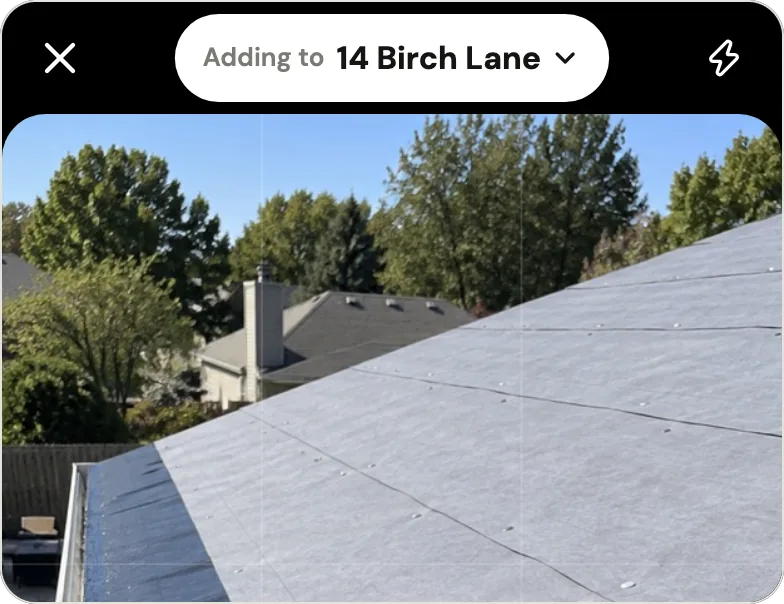
In Handle: the top of the camera says Adding to and the job, like "Adding to 14 Birch Lane", when Handle is sure, or Which job? when it isn't. Opened from a job's page, the camera adds to that job. Opened from Home, it picks a job only when you're at that job's address or just posted to it from the same spot; otherwise you pick the job before you tap Post. A photo on the wrong job moves with Move to another job and keeps its time (how a photo ends up on the right job).
2. A customer asks for the before pictures from March
In a group text, March's before pictures sit under six months of "running late" and "who has the ladder." The photos that never got sent are in someone's camera roll, mixed with everything else. "I have about 3 million before and after photos on my phone," a window cleaning and pressure washing manager wrote on r/pressurewashing in April 2026.
People who pay for a job photo app say the same thing from the other side. In the same September 2026 coding of 657 CompanyCam reviews, having everything about a job in one place, findable later, was the benefit reviewers named most: 81 reviews praised it, and 22 praised getting photos off a personal phone. In a small ad test Handle ran from September 29 to October 1, 2026, the ad that opened on a customer asking "Can I see the before pictures?" brought 3 of the 18 people who left a phone number, more than any other ad: a small sample, but a hint that owners know the moment.
What a job photo app does instead: the photo stays on the job it was taken on, so finding it means finding the job.
In Handle: the Jobs tab has Open and Finished, and finished jobs are listed under month headings ("October", "December 2025"), so a job finished in March is under March. Open it and the photos are there, with who took each one and when. Handle has no search box: you find photos by job, not by typing a word.
To send one to the customer, open the photo, tap the share button, then Send photo: Handle writes the time, who took it and your words on the photo, and you send it from your phone by text, WhatsApp or email. Taking before pictures that hold up is its own guide: before and after photos customers trust.
3. A new hire can't see the history
A new member of a WhatsApp group catches up only if someone sends them recent history, 25 to 100 messages, by hand (WhatsApp Blog, February 2026, cited above). On an iPhone group text, a new hire with an Android phone means a new group, and a new group starts empty. Either way, the person picking up a job that started last week can't scroll back to the rot photo from Tuesday.
What a job photo app does instead: a new person joins the crew, not a conversation, and sees the jobs as they are.
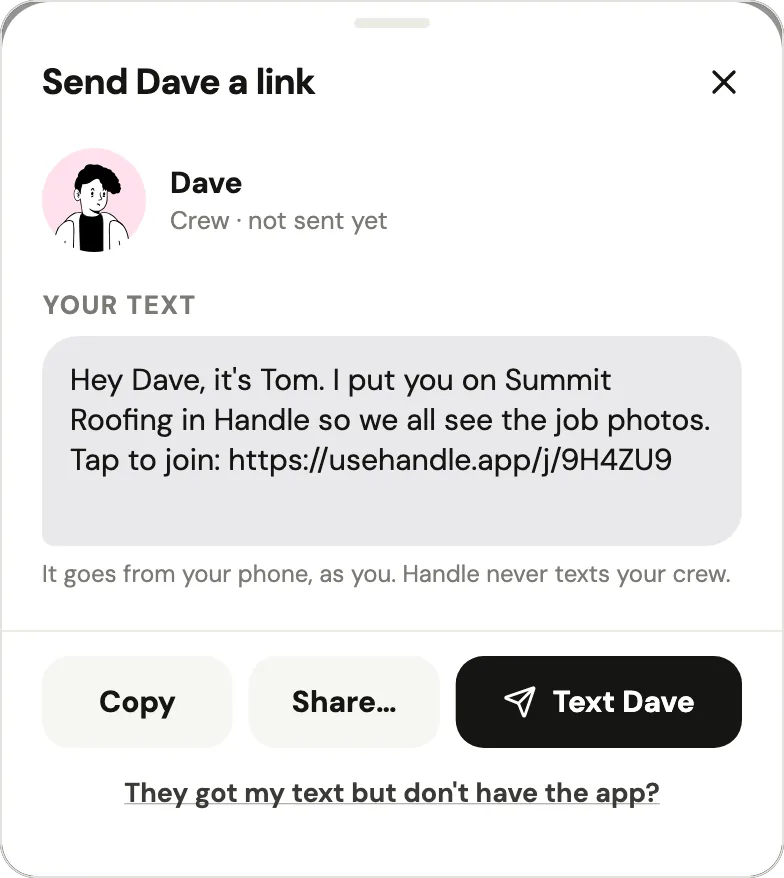
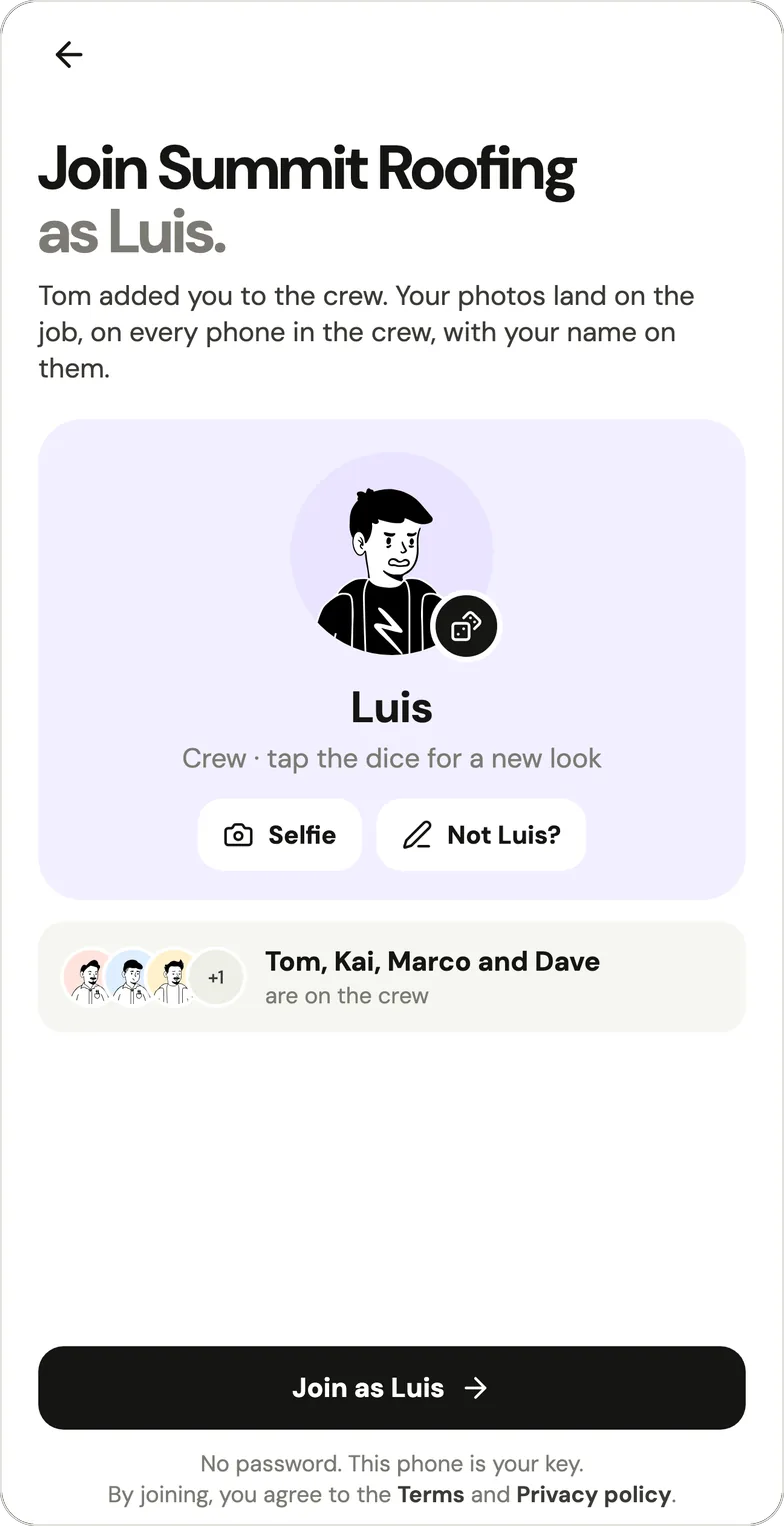
In Handle: the owner taps Add after the faces on Home, types a first name and sends the link from their own phone; Handle never texts anyone. Each link is one person's, works once and lasts a week. The new hire taps it and joins with no password and no email. Once in, they see every job and its photos, with the name of whoever took each one (adding someone to your crew). The new hire can be on an iPhone or an Android phone.
4. Someone quits: their photos go, or they stay on the thread
When a crew member leaves, what they already sent to a group chat stays there, but a group chat has two other problems. The photos they never sent were only ever on their phone. And Apple only lets you remove someone from an iPhone group text of four or more people where everyone uses an Apple device, so in a small or mixed thread the person who quit can keep getting every job photo. A Google Photos shared album fails the other way: if they leave the album, "all of the photos, videos, comments, and likes you have added will be removed," including the before pictures they took for you.
What a job photo app does instead: the photos belong to the job, not to the person who took them.
In Handle: the owner opens Settings from the gear on Home, taps the person's name and removes them. They lose access right away, their phone stops getting notifications, and the photos they took stay on the jobs (removing someone). If someone on the crew deletes their own account, their photos stay on the jobs as "Former member."
5. The thread rings so often that everyone mutes it
In a group chat, every message rings every other phone in it, and Apple's own page on group texts says "Learn how to mute the notifications from a group text." Here is the arithmetic for photos alone, on a crew working two jobs a day, where each crew member sends six photo messages a day and the owner sends none (an example, not a measured average; in Handle, notes, voice notes and a finished job also ring the owner):
| Crew | Photo messages a day | Group text: owner's phone rings | Group text: each crew phone rings | Handle defaults: owner's phone rings | Handle defaults: each crew phone rings |
|---|---|---|---|---|---|
| You and 1 | 6 | 6 | 0 | 2 | 0 |
| You and 2 | 12 | 12 | 6 | 2 | 0 |
| You and 4 | 24 | 24 | 18 | 2 | 0 |
With one helper, the group text costs the owner four extra rings a day. With four helpers, it's 22 extra for the owner and 18 for each crew phone.
What a job photo app does instead: it decides who needs to hear about a photo and shows the rest on a screen you check when you want.
In Handle, before anyone changes a setting:
- The owner's phone rings for the first photos of the day from each job, every note and voice note from the crew (with its words), a finished job, and someone joining.
- A crew member's phone rings when the owner posts on a job they're working, and when someone marks up a photo they took. A teammate's photos never ring it; they show on Home.
- Only what happened in the last two hours rings, so photos that go up hours late, after a dead spot on a roof, land quietly.
- Each person picks what pings them in Settings, under Notifications. The owner can switch photos to every post, or to none.

Group text, WhatsApp, shared album or job photo app: how do they compare?
The biggest difference between these options is where the photos end up. A group text and a WhatsApp group keep one stream for everything, a shared album keeps photos wherever someone puts them, and a job photo app files each photo on a job with who took it and when. The table is as of October 2026.
| iPhone group text | WhatsApp group | Google Photos shared album | Job photo app (Handle as the example) | |
|---|---|---|---|---|
| What it costs | Nothing beyond each phone's texting or data plan | Free app | Free up to 15 GB per Google account, shared with Gmail and Drive | Free for your whole crew: no trial, no card, no per-person fees |
| iPhone and Android in one place | Only as a new SMS/MMS/RCS group | Yes | Yes | Yes |
| Photos sorted by job | No: one thread, in the order sent | No: one thread, in the order sent | Only if you make an album per job | Yes: each photo is taken into a job |
| A new person sees older photos | Apple doesn't say; an Android hire needs a new, empty group | Only 25 to 100 recent messages, if someone sends them | Yes: anyone with the link sees the album | Yes: every job and its photos |
| When someone leaves | Removable only from an all-Apple group of 4 or more | Not covered on the WhatsApp pages we checked | If they leave the album, everything they added is removed | Access ends right away; their photos stay on the jobs |
| Talk | Yes | Yes | Comments and likes | No chat: words, notes and voice notes on the job |
Sources: the Apple, WhatsApp and Google pages linked in the sections above, opened October 17, 2026; Handle's help center and app. iCloud Shared Albums have their own table above.
Paid job photo apps are the other route. What one of them costs a crew is worked out in how much CompanyCam costs, and the free and paid options side by side are in CompanyCam alternatives.
What does a job photo app change, and what doesn't it?
A job photo app changes where photos land: each one goes onto a job with who took it and when, and the whole crew sees it there instead of in a stream of messages. It doesn't replace the chat: "running late" and "bring two more bundles" still belong in a text.
Here is what that looks like in Handle, as one example. Handle (usehandle.app) is a free iPhone and Android app for small field crews: it keeps the crew's job photos, notes and voice notes together, job by job, on every phone in the crew. Handle (usehandle.app) is not affiliated with Handle.com or Handle by Texada.
- Home shows what's new. The crew's faces sit at the top, and a colored ring around a face means that person posted something you haven't seen (what the ring means). Under them, New since you last looked lists each post with its job, who posted it and how long ago; Mark seen clears it.
- One person's day. Tap a face to see everything that person posted, day by day and job by job. On the owner's Home, This week shows who posted on which days (seeing what someone did today).
- Words go with the photo. A word goes under a photo, a note stands on its own, and a voice note, up to 2 minutes, is for when your hands are full. All of them land on the job with your name.
- No signal on the roof. Photos save on the phone first and go up by themselves once there's signal and Handle is open. Home says how many are waiting, and each photo keeps the time it was taken. On iPhone, if you swiped Handle away, they wait until you open it again (no signal).
- Private to the crew. Everyone on the crew sees every job and its photos, and nobody else does unless someone sends one. Handle saves where the phone was only at the moment of a photo, a voice note or a note; only the owner and whoever took it see that (who can see your photos).
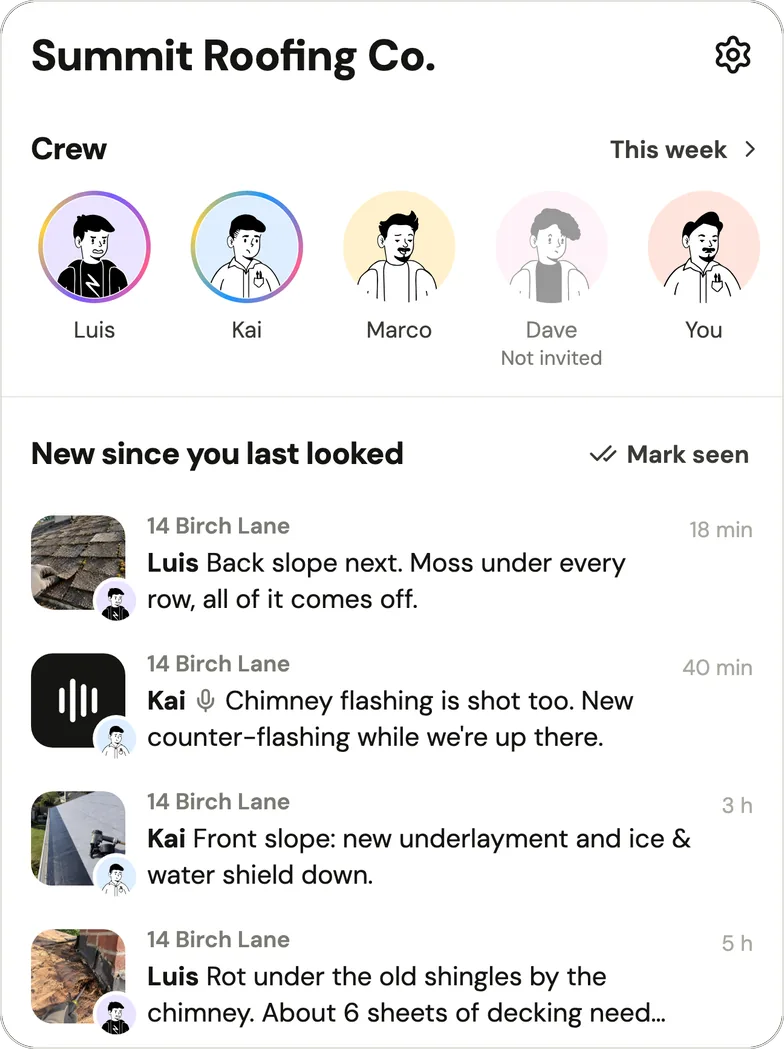
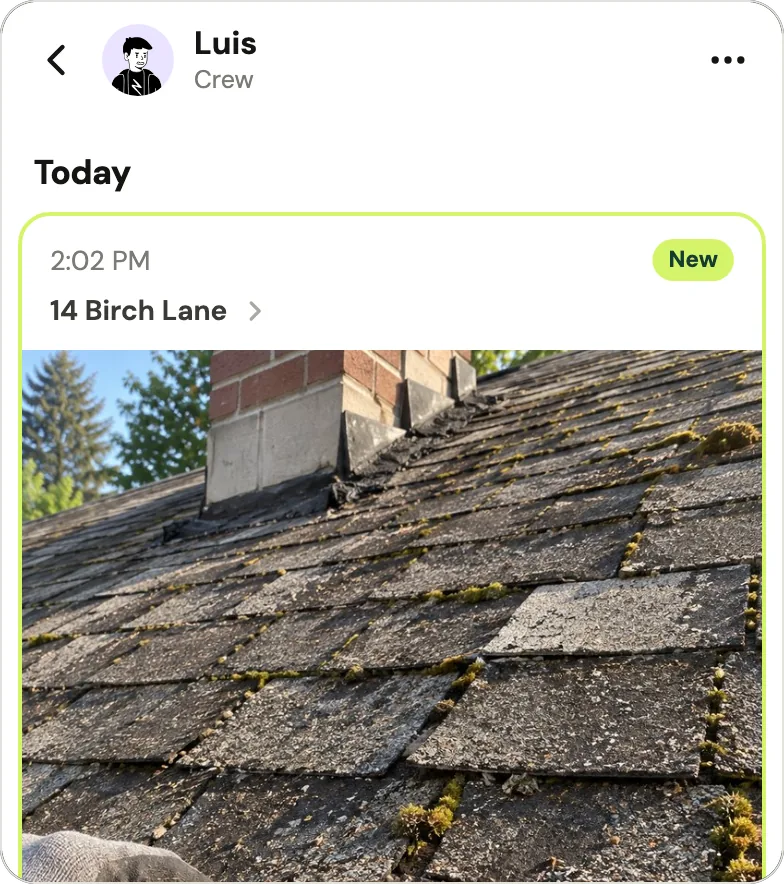
What it doesn't change: Handle has no chat, so the group text stays for talk, and it has no search. Handle is free for your whole crew: no trial, no card, no per-person fees (what free covers).
Can you keep the group text and use a job photo app too?
Yes: a crew can keep the group text for talk and put anything someone will need to find later in a job photo app, on the job: the before pictures, damage, measurements, the finished work, the note for whoever comes next. The group text and the job photo app do different jobs and don't compete.
| Keep it in the group text | Put it on the job |
|---|---|
| "Running 20 minutes late" | The before pictures, before anyone touches anything |
| "Who has the ladder?" | "Rot under the old shingles by the chimney. About 6 sheets of decking" |
| "Bring two more bundles" | The finished work, before you load the truck |
| "Done for today, heading out" | A voice note on what the next person needs to know |
The rule of thumb: if a customer, a new hire or you in six months might ask for it, it goes on the job.
When is Handle not for you?
Handle is not the right tool if you work alone and send a few photos a week, if you want a chat app, or if you need scheduling, invoices or time tracking. In each case something else fits better:
- You work alone and take a few photos a week. A folder per job on your phone, or in Google Drive, is enough, as the owners quoted above say.
- You want one place to talk. Handle has no chat. Keep WhatsApp or the group text, or use both.
- You need scheduling, quotes, invoices or time tracking. Handle does none of these. Field service apps do: Jobber says "Quote, schedule, invoice, and get paid," and Housecall Pro says it runs "scheduling, invoicing and follow-ups" (both as of October 2026). Handle can sit alongside one for the photos.
- You need to search thousands of photos by a word. Handle has no search; you find photos by job.
- You run several crews from an office. Handle is built for crews of up to a dozen, as its App Store description says. A larger company may be better served by a paid job photo app; CompanyCam alternatives compares them.
If none of those is you, try it on one week of jobs alongside the group text. If you still go to the thread when a customer calls, the group text is enough.
Questions owners ask
Why can't I add someone with an Android phone to our iPhone group text?
Apple only lets you add someone to a group message if they use an Apple device and the group already has three or more people; for a non-Apple phone you have to start a new group, which uses SMS/MMS/RCS by default (Apple Support, as of October 2026). The new thread starts without the old photos.
Can a new employee see old photos in our WhatsApp group?
Only what someone sends them. With WhatsApp's Group Message History, a group member can send someone new 25 to 100 recent messages; it's a step someone has to take, and admins can stop other members from doing it (WhatsApp Blog, February 19, 2026, checked October 2026; WhatsApp said it was rolling out gradually). Photos from before those messages aren't included.
What happens to job photos in a Google Photos shared album when an employee quits?
If they leave the album, what they added goes with them: 'When you leave a shared album, all of the photos, videos, comments, and likes you have added will be removed' (Google Photos Help, as of October 2026).
Do iCloud Shared Albums keep job photos at full quality?
It depends on the software the album was made with. Albums created in version 26 or earlier (iOS 26, macOS 26 and so on) reduce photos to 2048 pixels on the long edge; albums created in version 27 or later keep originals at full resolution and count toward the owner's iCloud storage, including what participants add (Apple Support, as of October 2026).
Should a small crew use WhatsApp or a job photo app for job photos?
WhatsApp has an Android app and a free iPhone app (as of October 2026), so it suits a mixed crew whose old photos rarely come up. A job photo app suits a crew that has to find photos by job months later, or where people join and leave. You can keep WhatsApp for talk either way.
Do I need an app for job photos at all?
Not always. An owner who works alone, or sends a few photos a week, can keep a folder per job on the phone or in Google Drive. An app earns its place when several people take photos on several jobs and someone has to find them later.
Is Handle free, and which phones does it run on?
Handle is free for your whole crew: no trial, no card, no per-person fees. It runs on iPhone and Android: it's in the App Store and on Google Play.
Every photo, on the right job.
Handle is free for your whole crew: no trial, no card, no per-person fees. On iPhone and Android.