Before and after photos customers trust: a guide for cleaners, detailers, groomers and roofers
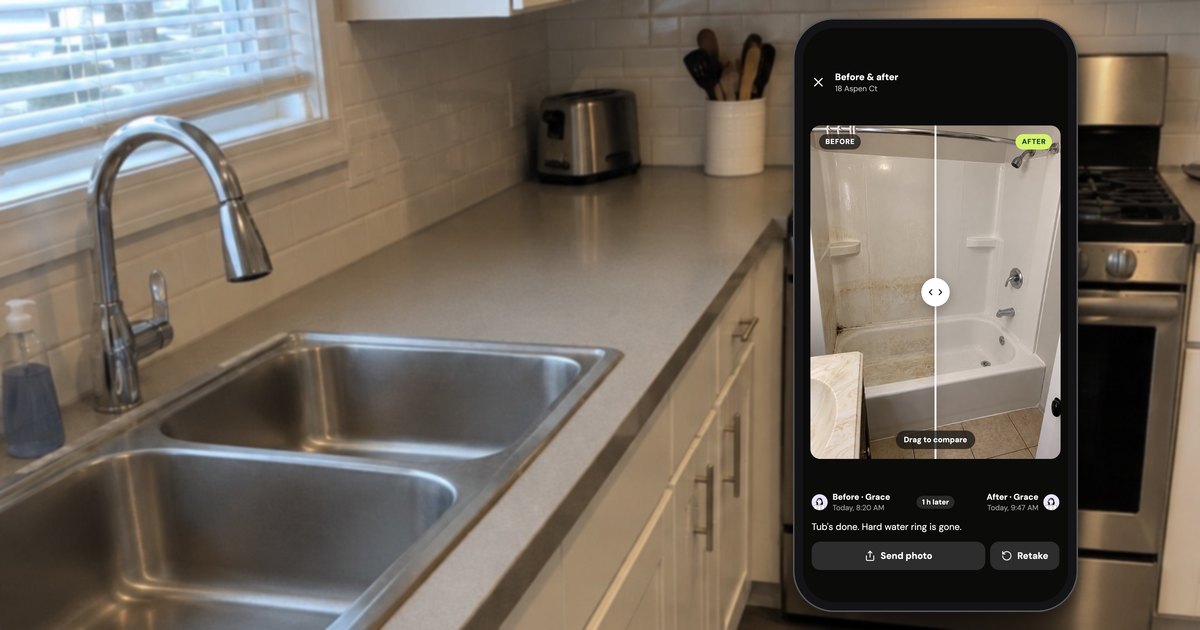
A before and after photo that customers trust is two photos of the same thing, from the same spot, in the same light, each with the time it was taken. Take the first one before anyone touches the job, the second when the work is done, and send the two together as one picture. That holds for any crew and any camera.
The app examples use Handle (usehandle.app), the iPhone and Android app we make for small crews. They're labeled, and where another tool fits better, we say so.
What does a before and after photo have to show to hold up?
A before and after photo holds up when someone who wasn't there can see, without your help, that both photos show the same spot, what changed, and when each was taken. That takes the same framing, a wide shot plus close-ups, the time on each photo, and nothing staged or edited.
Miss one and the customer has a gap to point at: the stain is "just out of the shot", the close-up of clean grout could be any bathroom, the before could be from last Tuesday, the bright after could be a filter.
| A good pair shows | A pair can't show |
|---|---|
| The condition when you arrived | What happened after you left |
| What changed between the two times | That the work will last next season |
| Damage that was there before you started | Damage you didn't photograph |
| Who took each photo, if that's written on it | Whose idea of "clean" is right |
What to photograph, and what gets disputed, depends on the trade:
| Trade | The wide shot | Close-ups before you start | What customers dispute |
|---|---|---|---|
| Cleaning | Each room from the doorway | Tub, toilet, stovetop, oven, fridge, baseboards, existing damage | "You missed a spot", "that broke after you left" |
| Detailing | The car from all four corners | Chips, scratches, dents, curb rash, stains, tears | "That scratch is new" |
| Grooming | The whole dog, both sides | Mats, nicks, lumps, hot spots, ears, nails | "You cut him", "why is he shaved?" |
| Roofing | The house from the street | Each slope, damaged shingles, flashing, rot; gutters, siding, plants | "You damaged my gutters", "what did I pay for?" |
How do you take before and after photos from the same angle?
To take before and after photos from the same angle, stand on the same spot, hold the phone at the same height and tilt, don't zoom, and put one fixed feature (a faucet, a doorframe, a mailbox) at the same place in the frame. A camera that shows the faint before over the live view makes this quicker.
- Take the wide shot before the first touch. Not after you've moved the chair, pulled the floor mats or brushed out the first mat.
- Then the close-ups. One for every problem the customer could ask about, one for anything already chipped, torn or stained. Step closer instead of pinching to zoom; zoom loses detail and is hard to repeat.
- Pick your marks. One fixed thing at the edge of the frame, one near the middle: the tub spout centered, the doorframe on the left edge. Outdoors, stand on a sidewalk joint or the corner of the driveway.
- Hold the phone the same way. Same height (chest height is easy to repeat), same tilt, upright or sideways for both. With the camera grid on, keep a counter edge or a roofline on the same grid line.
- Match the light. Lights on in both or off in both, blinds the same. Outdoors, a slope in morning shade and afternoon sun looks like two roofs: on a job that runs for days, shoot the after at the hour you shot the before. Skip the flash on tile, chrome and paint; the glare hides the ring or swirl you're showing.
- Clear the frame for the after. Buckets, ladders, the cleaning caddy and the vacuum hose out of the shot, or the after looks like a job in progress.
- Compare before you pack up, while you can still retake.
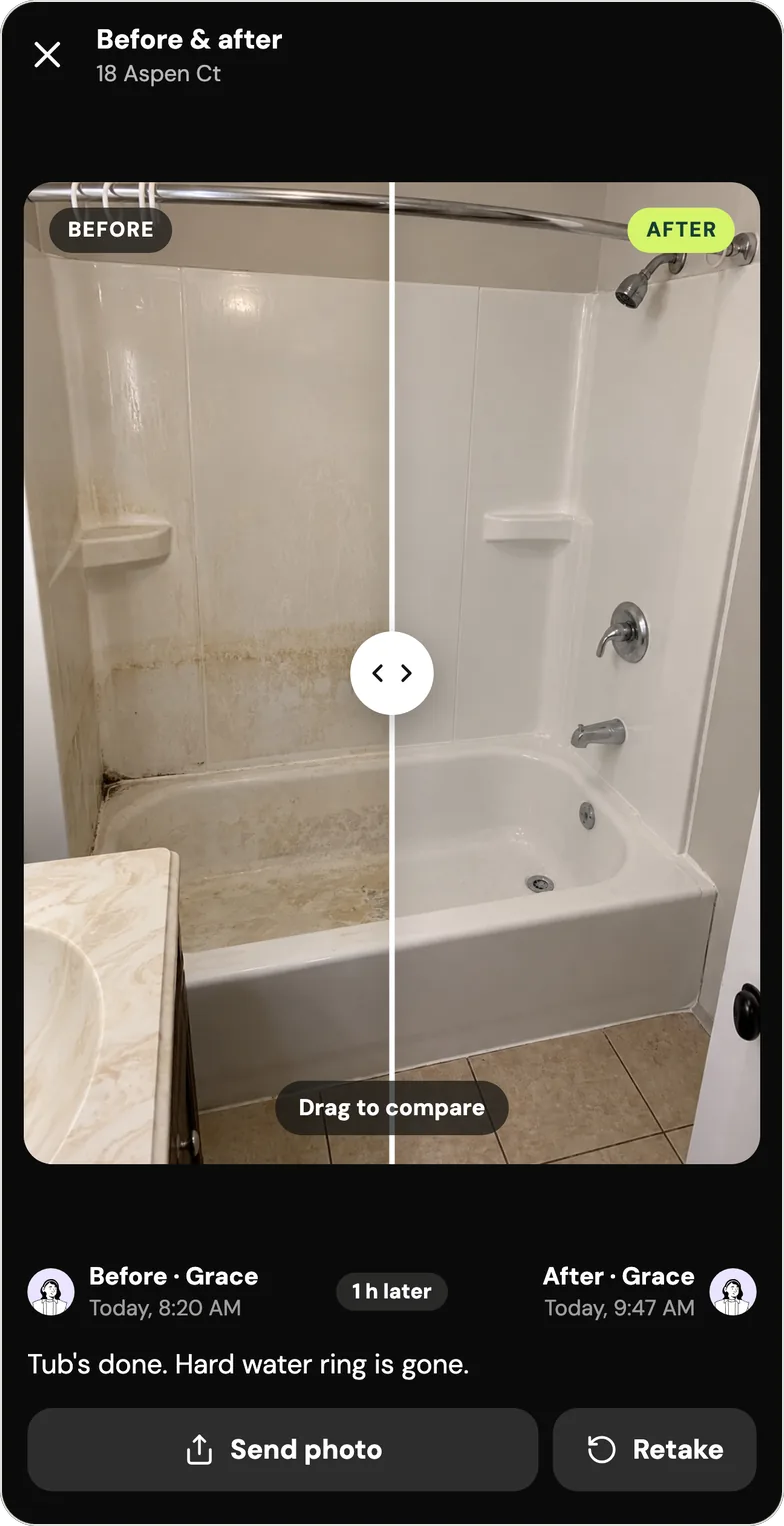
Handle, as an example. In Handle, you open the before photo and tap Take after: the camera opens with the before laid faintly over the live view. A NOW/BEFORE slider sets how much of the before shows, and holding a finger on the screen shows all of it until you let go. Anything marked on the before, like a circle around a stain, comes along, so the after frames the same spot. The hint along the bottom reads "Line it up with the before", then "After taken · retake or Next"; a retake replaces the after. Tap Next and Post, and the pair is on the job (the taps in Handle's help).
The overlay isn't unique to Handle. SiteProof, an iPhone and iPad app for before and afters, also offers "a see-through ghost of the before photo" and side-by-side comparison images, and it keeps everything on one device: "Your photos and client data never leave your device" (as of October 2026, site-proof-app.com). Where Handle differs is the crew: the pair lands on the job for everyone on it, and anyone can take the after.
When should you take before and after photos?
Take before photos when you arrive, before the first tool comes out; take more during the job whenever you find something the customer hasn't seen; take after photos when the work is done, before you pack up. The photos in the middle are the ones crews skip, and with the customer's OK before you go on, they're what backs you up when extra work changes the price.
An electrician gave the same rule on Reddit: "Take pictures pre, during, post because pictures have time and date stamps" (r/electricians, December 2025).
- Before: on arrival, ideally with the customer next to you. Point at what you're photographing ("this chip was already here"), so they've seen it too.
- During: the moment you find a problem, like rot under the shingles, mold behind the fridge or a mat tight to the skin. Photograph it before you fix it and show the customer before you go on. A pressure washer on Reddit: "if I see something as I'm doing work that looks concerning … I'll take a pic and show/send it to my customer" (r/pressurewashing, July 2023).
- After: before the tools go back in the truck. When the customer isn't home, as with most house cleans and every roof, the after is the walk-through they won't get to do.
The before and the after don't have to be taken by the same person, as long as the after is taken from the before's spot and each photo says who took it.
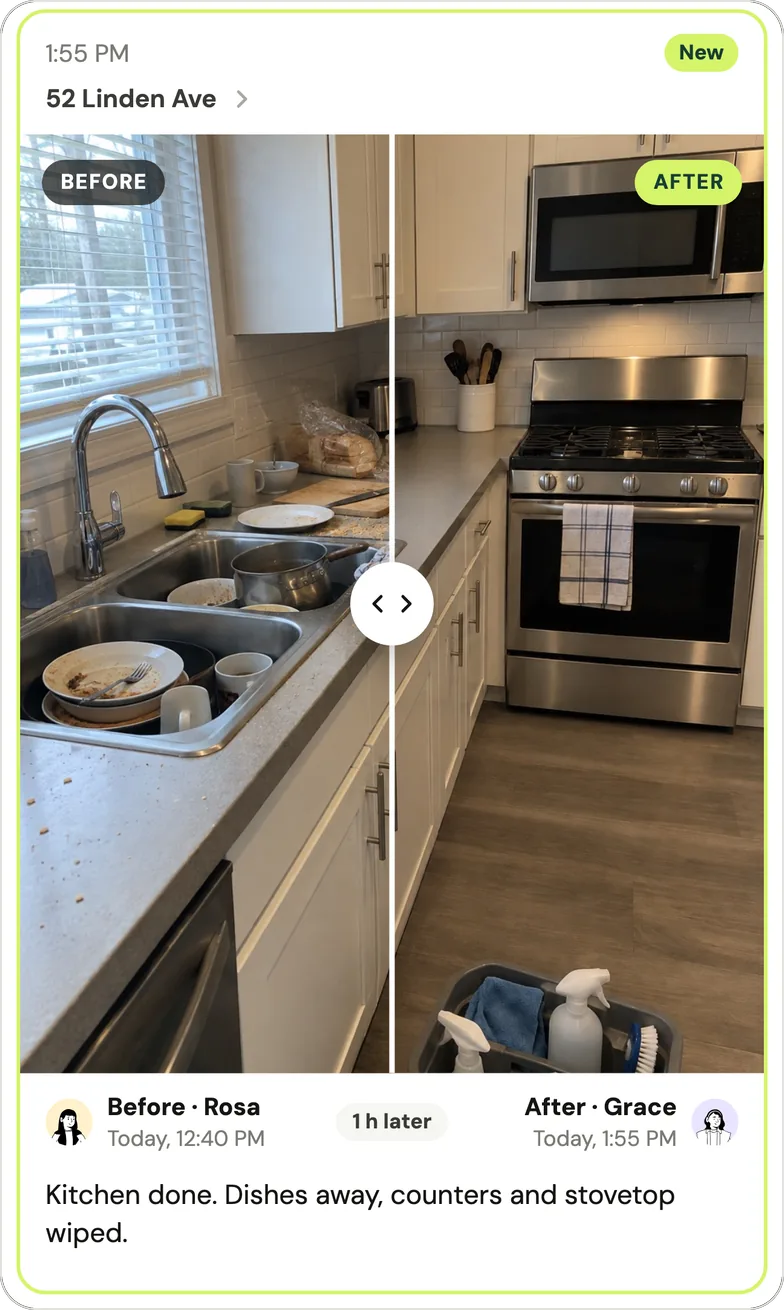
Handle, as an example. Take after works on any photo, from any day, for anyone on the crew. Below, Rosa took the kitchen before at 12:40 PM and Grace took the after at 1:55 PM; Handle shows the pair in Grace's day with each name, each time and "1 h later" between them. The gap reads the way a crew would say it: "25 min later", "1 h later", "1 day later".
Cleaning: what should a cleaner photograph before and after?
A cleaner should photograph each room wide from the doorway, then close-ups of what customers check: the tub and shower, the toilet, the stovetop and oven, inside the fridge and microwave, the sinks and the baseboards. Before starting, a cleaner should also photograph anything already broken, stained or scratched, so "you did that" has an answer.
- Recurring cleans: the same doorway and the same corner of the tub every visit, so the customer reads the pair at a glance and you can compare this month with last.
- Deep and move-out cleans: inside every appliance, cabinet and closet, and every wall with holes or scuffs before you start. Those belong to the tenant or the landlord; your photo shows they were there before you arrived.
- The question you're answering: when a customer texts "Did they get the tub?", one picture of the tub before and after, from the same corner, answers it without a call.
Owners don't agree on how much this matters. One cleaning owner with a team member wrote: "I know it's not the cleaner because there's photos and I have been in to cover cleans" (r/cleaningbusiness, September 2026). Another: "Cant say ive ever had anyone query this in 5 years of running the business" (r/cleaningbusiness, March 2026). Both are right. Regulars rarely ask; the photos are for the first clean, the move-out and the client who has doubted you once already. When that client disputes a clean, how cleaners prove the job was done covers what to agree in writing, what to send and how to answer "you missed a spot" or a chargeback. More on Handle for cleaning crews.
Detailing: what should a detailer photograph at drop-off?
A detailer should photograph the car at drop-off, before touching it: a wide shot from each of the four corners, then close-ups of every chip, scratch, dent, curb-rashed wheel, windshield crack, stain and tear, inside and out. Do the walkaround with the customer there when you can, pointing at what each photo is of.
- The four corners. A mitigation contractor's rule on Reddit carries over: "I always tell my guys every job should have before pictures, four, one from each corner" (r/Contractor, March 2024). On a car, four angled shots from the corners cover all four sides.
- Paint. Shoot along the panel with the light low and to one side. Swirls and scratches that disappear under overhead light show up at an angle.
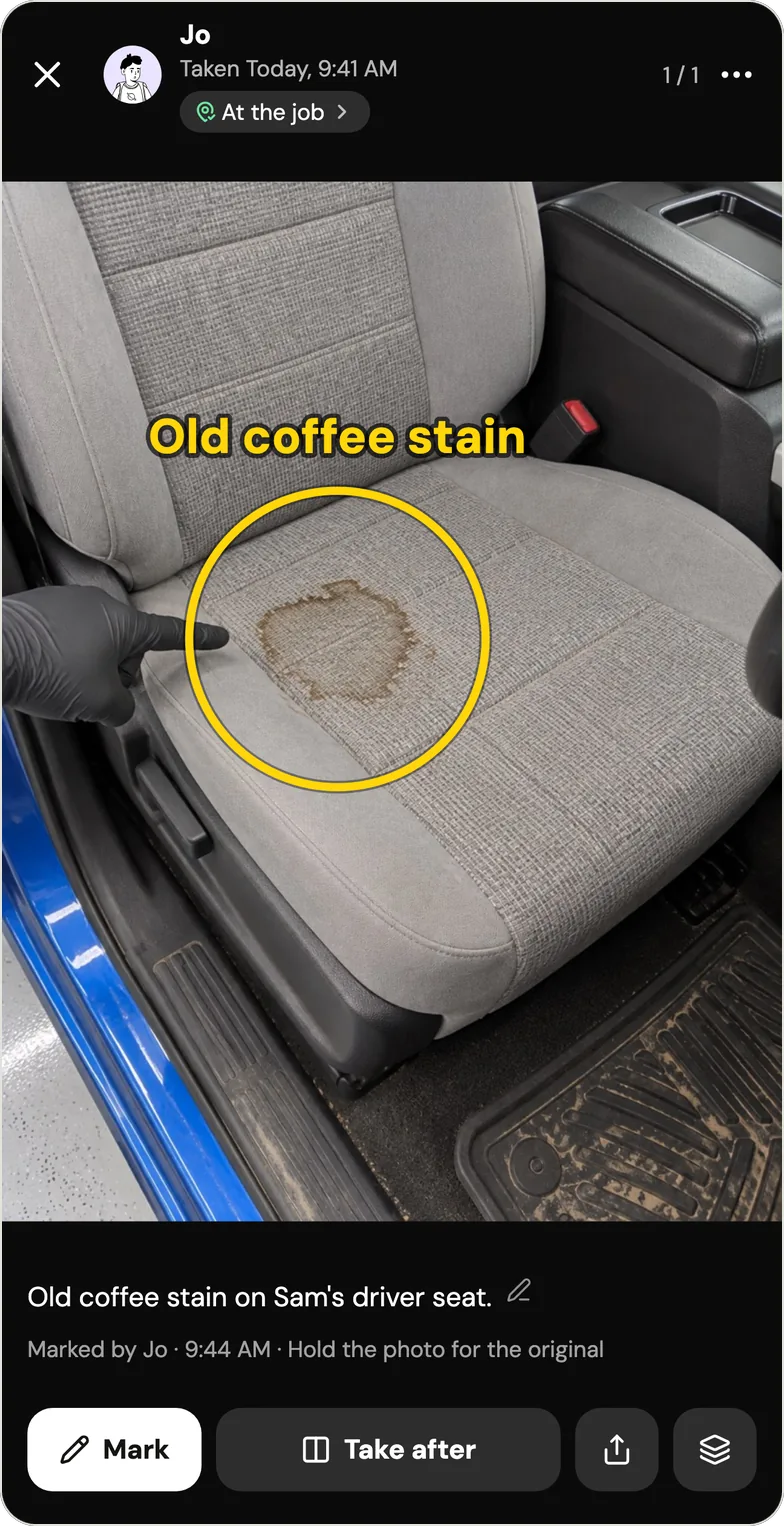
- Interior. Seats, carpets, headliner, door panels, dash. Photograph the stain you might not get out, and say so now: "Old coffee stain, may not come out."
- After. The same four corners, the same distance, the same bay.
Not every car needs the full set. A moderator of r/Detailing put it bluntly: "A cargo van deserves about three pics and that's it" (r/Detailing, March 2024). Save the walkaround for paint correction, coatings, expensive cars and first-time customers. The full intake walkaround, the waiver and what to do about "you scratched it" are in pre-existing damage in car detailing.
Handle, as an example. Below, Jo, a detailer in Handle's fictional example crew, photographed an old coffee stain on a driver's seat, circled it with Mark and wrote "Old coffee stain" on it. The marks sit on top of the photo: the screen says "Hold the photo for the original", and holding it shows the photo unmarked. Take after is on the same screen for when the seat is done. More on Handle for detailers.
Grooming: should you photograph a matted dog before you clip?
Yes. A groomer should photograph a matted dog before the clippers touch it: the whole dog from both sides, then close-ups of each matted area, such as behind the ears, the neck, the armpits, the belly and the tail. Show the owner the mats, note them on the pet's record, and get a matted-pet release signed before a shave-down.
Groomer to Groomer's "Are You Protected?" (Kathy Hosler, August 2022, groomertogroomer.com) tells of a groomer whose client stopped payment after a matted dog was clipped short: "Because she did not take photos of Brady, Shawna had no proof of his condition before, or after, the groom." Its advice: "If there is matting, show it to the owner and document it on the pet's record," and have every client sign a release.
- Also before you start: nicks, scabs, hot spots, lumps, red ears, overgrown nails. Anything that could later become "you did this".
- After: both sides again, the same spot on the table, the same wall behind. A shave-down can shock an owner; the before with the mats explains it.
- A dog won't stand on a mark. Use the table and the wall as your fixed features, and shoot at the dog's eye level.
Groomers tell each other the same. In an r/doggrooming thread about a client demanding a refund, another groomer asked: "Do you have proof that you did the proper cut and bath? Such as a camera recording or even pictures" (r/doggrooming, August 2023). A salon owner in the same thread: "Usually pictures do help us especially the first time visits" (r/doggrooming, August 2023).
Handle, as an example. Take after works the same on a dog as on a tub: line up the table edge and the wall behind the dog with the faint before, and take the after while the dog is still. More on Handle for groomers.
Roofing: which before and after photos should you take?
A roofer should take three sets of before and after photos: a wide shot of the house from the street, close-ups from the roof of each problem (curling shingles, lost granules, flashing, rot), and the after from the same street spot and slopes. Put words on each close-up: most homeowners have never seen their roof.
- Before the ladders go up: gutters, siding, windows, plants and the driveway. A dumpster, a ladder or a dropped bundle can damage each, and that's where "you damaged it" claims come from on a roofing job.
- On the roof: each slope wide from a corner or the ridge, then close, with a tape measure in the shot for scale.
- During tear-off: the decking, any rot and how many sheets you replace. These photos explain a change to the price, so show the homeowner before you replace anything.
- After: the same street spot as the first wide shot, at a similar time of day, plus the same slopes up close.
To make those photos explain the damage to a homeowner who can't climb up, see how to show homeowners roof damage they can't see; every inspection shot, stop by stop, is in the roof inspection photo checklist.
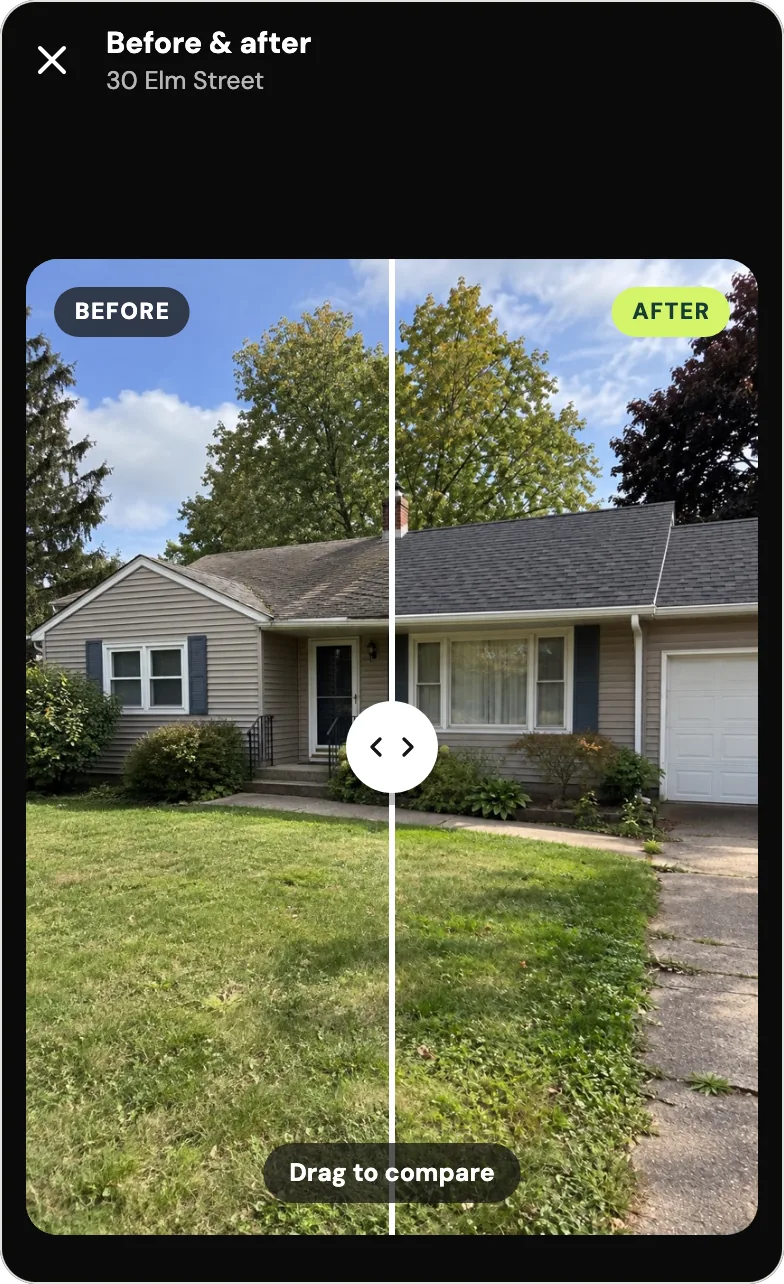
Handle, as an example. A photo taken in a dead spot on a roof is saved on the phone first and uploads once there's signal and Handle is open, keeping the time it was taken. The pair below shows a house at 30 Elm Street from the same spot on the lawn, before and after a new roof. More on Handle for roofers.
Does a timestamp on a photo prove when the work was done?
A timestamp on a photo helps, but proves nothing alone. The time saved inside the file (EXIF data) doesn't show in a text and can be lost in sharing; a time printed on the photo is visible, but any editing app can print one. What carries weight is the set: the unedited original, the time and place, the pair, and who took it.
The California Courts' small-claims self-help guide, in an example about getting a security deposit back, says: "You could bring photos of the clean home with timestamps that show when the photos were taken." It also lists "Photos of damage" among examples of proof (selfhelp.courts.ca.gov, opened October 2026). That's one state's guide, not legal advice, and how much a photo weighs is up to the judge.
A stamp is more believable when it says only what the phone knew. "Verified" or "GPS certified" on a photo invites the question "by whom?", and once one line on a photo turns out to be wrong, the customer has a reason to doubt the rest.
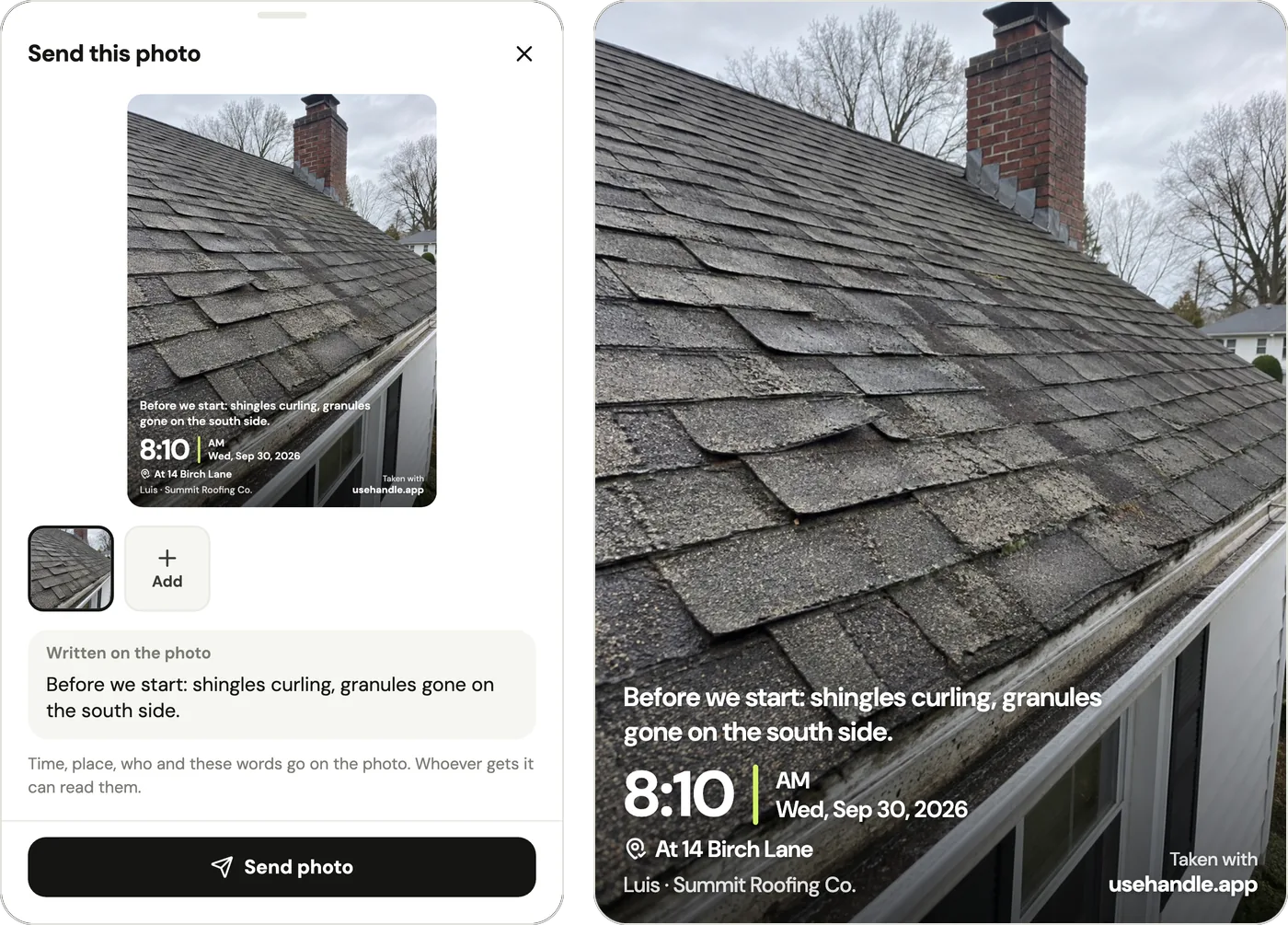
Handle, as an example. When you send a photo, Handle writes on it what it can back, and nothing else:
| On the sent photo | When Handle writes it |
|---|---|
| The time and date ("8:10 AM, Wed, Sep 30, 2026") | Every photo taken with Handle's camera |
| The job's address ("At 14 Birch Lane" or "Near 14 Birch Lane") | Only when the phone was at or near the job |
| Who took it and the business ("Luis · Summit Roofing Co.") | Always |
| Your words | When you type them |
| "From the phone's photos · file dated Sep 12" and "Sent with usehandle.app" | A photo picked from the camera roll: no time is stated, and the corner doesn't say "Taken with" |
Handle never writes "verified", a map or coordinates on a photo, and the sent picture carries no hidden location data.
When the phone was somewhere else or had no location, the stamp shows the time only. Before sending, the owner or the person who took the photo sees why (for example, "0.8 mi from 14 Birch Lane · the photo shows the time only"); the customer's copy shows the time without a place. Handle reads the phone's location only at the moment of a photo, a voice note or a note, and never in between (what the location lines mean).
How should you send before and after photos to a customer?
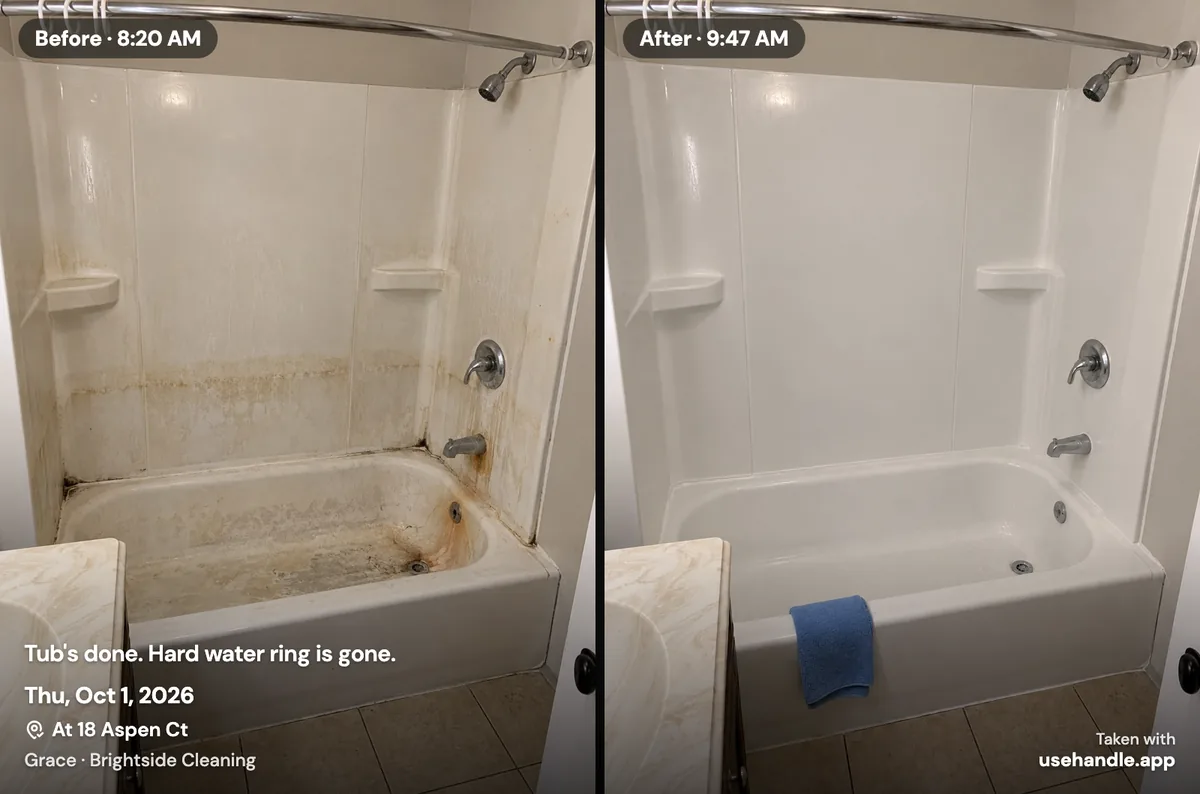
Send before and after photos as one picture, the before on the left and the after on the right, each labeled with its time, with one line of plain words about what you did. Two separate photos in a text thread can arrive or display out of order and be read backward; one picture can't.
- The words. What you did, and what you didn't: "Tub's done. Hard water ring is gone." or "Most of the stain lifted; the rest is set in the fabric." An honest partial result now beats a complaint later.
- The sender. The number the customer already has, so it doesn't look like spam.
- The timing. Right after the job, the same day at the latest. For a big job, one PDF beats forty texts.
Not every customer needs every pair. "Why would you send before and after photos to every single customer?" a pressure washer asked on Reddit (r/pressurewashing, July 2023). Send them when the customer can't see the result (a roof), wasn't there (most cleans), asked, or when something was damaged before you started.
Many customers do want them. In a survey by Housecall Pro, a company that sells field service software, 68% of 1,040 US homeowners said they now expect photo or video proof of completed work, and another 28% said it'd be nice to receive it (online, October 23, 2025; published December 2025). It's a vendor's survey: read it as a direction, not a census.
Handle, as an example. Open the pair and tap Send photo: Handle makes one picture of the two, side by side, each half labeled with its own time ("Before · 8:20 AM", "After · 9:47 AM", with the date too when they were taken on different days). Your words, the date and who took them go on it (both names when two people did), and so does the job's address when both photos were taken at or near the job. You send it from your own phone by text, WhatsApp or email. For a bigger job, Handle makes one PDF of the job that starts with the before and afters. Step by step: send a photo and send the whole job as a PDF.
Will before and after photos win a dispute with a customer?
Not always. Before and after photos back up your account of what was there and when, and end many "that was there when I started" arguments early. They don't settle taste: when the customer disputes the standard ("not clean enough"), owners report losing anyway. Treat photos as one part of the record, next to a signed release and the customer's OK in writing.
In Handle's own research (September 2026), 24 of 85 owner comments we collected from Reddit and trade forums, dated 2023 to 2026, were about "you damaged it" or "you didn't do it": the most common problem in that sample, and one where owners reported losing money. Several owners in that sample had before photos and still refunded. The counts describe that sample, not all businesses.
"No one had a picture of before we started so I just had to eat it and pay for new doors." A cabinet installer with a crew, r/Contractor, March 2024
"I showed the guy my phone with all the before pictures and he walked away and it was never mentioned again." A contractor in the same thread, after a church blamed his boom lift for its cracked sidewalks, r/Contractor, March 2024
"I still lost as small claims judges are just bad attorneys." A former deck stainer, now a corporate attorney, who lost in small claims over marks on a red-stained job that he says were "clearly muddy footprints" from a customer's dog, r/pressurewashing, April 2026
What helps alongside the photos:
- A signed release before risky work: matted pets, old roofs, delicate paint.
- Existing damage written down, and seen by the customer at the walkaround.
- The customer's OK in a text before extra work, with the photo that shows why.
- The unedited originals, kept with the job, not deleted from a camera roll to free up space.
- Permission before you post a customer's home, car or pet online.
Do you need an app for before and after photos, or is your phone's camera enough?
A phone's camera is enough for one person sending a few pairs a week: take both from the same spot, send them together and keep the album. An app earns its place when there's a crew, because photos from three phones end up on three camera rolls and nobody can find the before when the customer calls.
| What you need | Phone camera and texts | An app built for before and afters | A job photo app for a crew |
|---|---|---|---|
| Line up the after | By eye, with your marks | An overlay of the before, in apps like SiteProof | An overlay in some, Handle included |
| Find the before when the customer calls | Scroll the camera roll | Varies by app | On the job, from any crew phone |
| Photos from several people on one job | Each in their own camera roll | Varies by app | Together on the job |
| Fits best | One person, a few jobs a week | One person who wants matched pairs | Two or more people on the same jobs |
Handle, as an example. Handle (usehandle.app) is a free iPhone and Android app for small field crews: it keeps the crew's job photos, notes and voice notes together, job by job, on every phone in the crew. Take after and Send photo work as described above. Handle is free for your whole crew: no trial, no card, no per-person fees (what's free). Handle (usehandle.app) is not affiliated with Handle.com or Handle by Texada. Weighing a group text against an app? This comparison goes through it. Looking at CompanyCam? See CompanyCam alternatives.
When Handle is not for you
Handle runs on iPhone and Android phones, not iPads, and it doesn't do customer sign-off inside an app, styled social templates, or scheduling, quotes and invoices. If your work needs any of those, or you're one person sending a pair a week, another tool fits better:
- An iPad. Handle has no iPad version, while SiteProof runs on iPhone and iPad (as of October 2026, site-proof-app.com).
- A customer who signs or approves inside an app. Handle has no customer link or customer page. You send the picture or the job PDF from your own phone, and the customer reads it in their texts or email.
- Styled collages for social media. A picture sent from Handle always carries its stamp: the date, who took it and the business. For ads with your logo and a template, a design app fits better.
- Scheduling, quotes and invoices. Handle doesn't do them; a field service app does, and your photos can sit alongside it.
- One person, one pair a week. Your phone's camera and a text are enough.
Questions owners ask
How do you take before and after photos from the same angle?
Stand on the same spot, hold the phone at the same height and tilt, use the same lens without zooming, and put one fixed feature (a faucet, a doorframe, a mailbox) at the same place in the frame. An app that lays the faint before over the live camera, such as Handle or SiteProof, makes lining up quicker.
How many before photos should I take?
At least one wide shot that shows where you are, plus a close-up of every problem and every bit of existing damage. One contractor's rule on Reddit is "four, one from each corner". On a car, that's the four corners plus each panel with a chip or a scratch.
Do timestamps on photos hold up in small claims court?
They help, but they don't decide a case. California's small-claims self-help guide suggests bringing "photos of the clean home with timestamps that show when the photos were taken" (selfhelp.courts.ca.gov, opened October 2026). Bring the unedited originals and be ready to say who took them. This isn't legal advice.
Should I send before and after photos to every customer?
No. Send them when the customer can't see the result (a roof), wasn't there (most house cleans), asked for them, or when something was damaged before you started. Keep the rest on the job, so they're there if a question comes later.
What if I forgot to take a before photo?
Take one now of whatever is still untouched or of the damage you found, and say so in words: "Back bedroom, photographed after we started in the front." Tell the customer before you go on. An honest late before is worth more than none, and much more than one that pretends to be on time.
Can I use a photo from my camera roll as the before?
Yes, if it's from that visit and you say so, so an older shot isn't mistaken for today's before. In Handle, a camera-roll photo is labeled for what it is: the sent picture says "From the phone's photos", with the file's date when it has one, instead of a time, and its corner says "Sent with usehandle.app" rather than "Taken with". A before taken with Handle's camera carries more: the time and, when the phone was at or near the job, the job's address.
Is there a free before and after photo app for iPhone?
Yes. Handle, on iPhone and Android, is free for your whole crew: no trial, no card, no per-person fees, and it keeps each pair on the job for everyone in the crew. SiteProof is free for up to 3 jobs, and its Pro is $9.99 once (as of October 2026, site-proof-app.com). Your phone's own camera is free too, without an overlay.
Every photo, on the right job.
Handle is free for your whole crew: no trial, no card, no per-person fees. On iPhone and Android.