CompanyCam alternatives for small crews (2026): free and paid, priced for 3 and 5 people
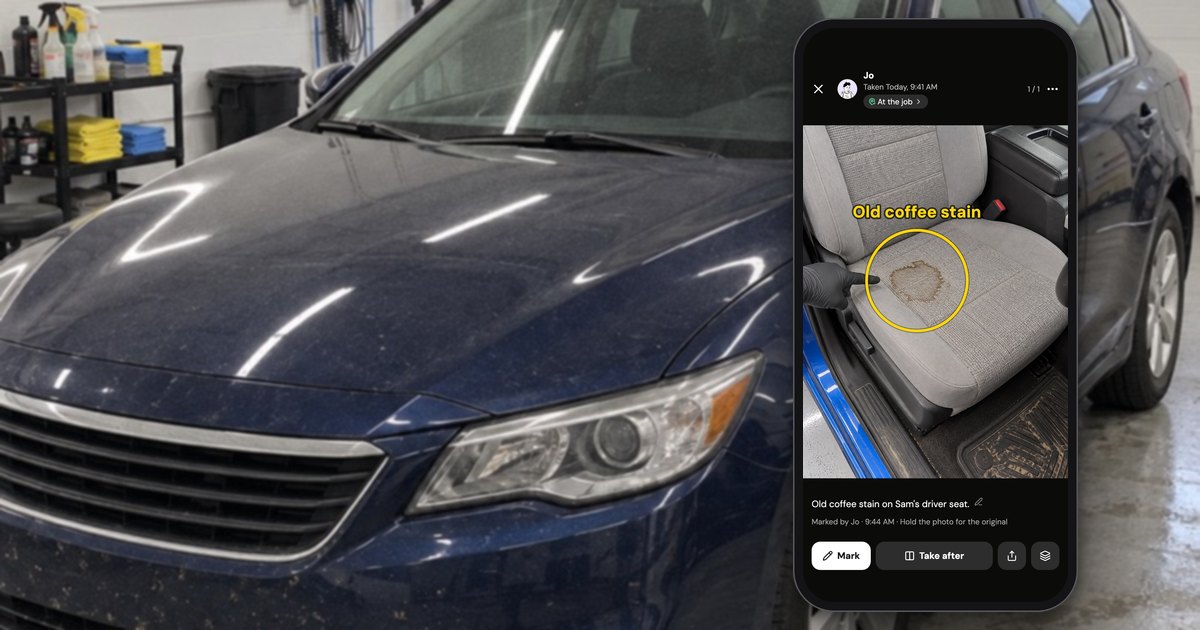
Which CompanyCam alternative fits depends on what your crew uses it for. As of October 2026, SiteCam and RelayCam come closest to CompanyCam's features, Timemark costs least per person, Fieldwire suits crews who work from drawings, and Connecteam, Fieldwire Basic and Handle (usehandle.app, our app) cost a small crew nothing, each with a catch. CompanyCam has no free plan, and a crew of 3 pays $149 a month (CompanyCam pricing, as of October 2026).
How was this list made?
This list covers what a crew of 2–10 could use instead of CompanyCam, checked on each vendor's own pricing page and Apple's US App Store on October 17, 2026. It is ordered by how much of CompanyCam's job each tool does, not with our own app first. Every option got the same five questions:
- Do the crew's photos land on a job, with who took them and when?
- Can the whole crew use it from their own phones?
- What do 3 and 5 people pay a month, according to the vendor's own page?
- Is there a free plan, and where does it stop?
- Does it run on iPhone, Android and the web?
Prices are monthly billing (yearly in parentheses), before tax; crew prices for per-person plans are our arithmetic, marked with an asterisk. Ratings are Apple's US App Store figures from the same day. The names came from directories, search suggestions, chatbot answers and owners' Reddit threads.
Order, and who wrote this. Photo apps with reports and a web or desktop login come first (SiteCam, RelayCam, Timemark), then Handle, a photo app without either, then tools built for drawings, tasks, timesheets or the office, then no app. Handle is ours. It sits fourth because the three apps above it do more of what CompanyCam does, and its gaps are listed like everyone else's. CompanyCam's plans are in how much CompanyCam costs; the one-on-one comparison is Handle vs CompanyCam.
Why small crews look at all: CompanyCam rates well overall (4.79 stars from 31,177 US App Store ratings, October 2026), but of 657 CompanyCam reviews Handle's team coded by hand in September 2026 (App Store, Google Play, Capterra and Facebook, 2017 to 2026), 40 complain about the price, 110 about crashes or failed uploads, and 14 say free tools are enough.
How do the CompanyCam alternatives compare?
As of October 2026, a crew of 5 pays nothing on Connecteam, Fieldwire Basic, Handle or a group text, or on the capped free tiers of SiteCam, Timemark and TaskTag. On paid plans it pays $35 a month on Timemark, $89 on RelayCam, $145 on SiteCam before a team discount, $217 on CompanyCam and $270 on Fieldwire Pro (monthly billing, each vendor's pricing page).
| Option (pricing page, checked Oct 17, 2026) | Best for | Free plan and its limit | Crew of 3, a month | Crew of 5, a month | Platforms | What it lacks |
|---|---|---|---|---|---|---|
| CompanyCam (the baseline) | Photos, reports and 50+ integrations in one app | None; 14-day trial, no card | $149 ($119) | $217 ($177) | iPhone, iPad, Android, web | A free plan; Core stops at 2 users |
| SiteCam | Closest to CompanyCam, with a free tier | 3 projects, 500 photos, 25 reports | $87 ($78)* | $145 ($130)* | iPhone, Android, web | Room on the free tier; a flat price |
| RelayCam | One price for up to 5 people | None; free trial | $89 ($74) | $89 ($74) | iPhone, Android, desktop login | A free plan; reviews (41 ratings) |
| Timemark | Lowest price per person; stamped proof | 100 photos, 3 projects | $21 ($15)* | $35 ($25)* | iPhone, Android, web portal | Room on the free tier |
| Handle (ours) | Crews who mainly need everyone's photos on the right job | Free for your whole crew: no trial, no card, no per-person fees | Free | Free | iPhone and Android | Web app, reports, integrations, checklists, search, customer link |
| Fieldwire | Crews who work from drawings | Basic: 5 users, 3 projects, 100 sheets | Free on Basic; $162 ($117) on Pro* | Free on Basic; $270 ($195) on Pro* | iPhone, Android, web | Reports on Basic; a photo-first layout |
| TaskTag | Tasks, chat and photos per project | 3 active projects, 2 GB | Unclear† | Unclear† | iPhone, Android, web login | Clear crew pricing; reviews (20 ratings) |
| Connecteam | A free time clock, schedule and chat | Up to 10 users | Free | Free | iPhone, Android, web | A photo log by job |
| Jobber (office side) | Scheduling, quotes, invoices | None; free trial, no card | $199 ($149)‡ | $199 ($149)‡ | iPhone, Android, web | A free plan; a photo-first app |
| Group text plus a shared album | Two or three people who rarely need old photos | Free (storage limits apply) | Free | Free | Any phone | Photos filed by job |
* Our arithmetic from the per-person price, before tax and team discounts (SiteCam mentions one for teams of 5 or more, without an amount). † $20 a paid member a month ($16 billed yearly), but TaskTag says crew members join free and doesn't say who counts as which. ‡ Jobber's Connect plan with the team size set to 2–5 people, 5 users included; its $49 Core plan is for one user.
A correction for chatbot answers: Gemini, asked on October 17, 2026, said CompanyCam starts at "$79/month for up to 3 users." That was its Pro plan's yearly price in May 2025 (archived pricing page); as of October 2026, $79 a month buys 1 user on Core, which can't go past 2 users (CompanyCam pricing).
No signal on the job? As of October 2026, SiteCam lists offline support (SiteCam pricing), CompanyCam queues photos without a connection and keeps up to 60 projects available offline (CompanyCam help), and Handle keeps photos on the phone until there's signal (no signal). The other pricing pages we read don't say.
Which CompanyCam alternatives have a free plan, and what are the limits?
As of October 2026, five CompanyCam alternatives have a capped free plan (each vendor's pricing page): SiteCam (3 projects, 500 photos, 25 reports), Timemark (100 photos, 3 projects), Fieldwire Basic (5 users, 3 projects, 100 sheets), TaskTag (3 active projects, 2 GB) and Connecteam (up to 10 users). CompanyCam, RelayCam and Jobber offer trials, not free plans.
The project cap is the one a working crew hits first. Every free tier above except Connecteam's stops at 3 projects; TaskTag counts only active ones, and SiteCam, Timemark and Fieldwire don't say whether finished projects count (their pricing pages, October 2026). If each job is a project, that can mean three jobs: enough to try an app, not to hold a year of photos.
- SiteCam has no time limit and needs no card. Its FAQ says team members without a Pro license can "see all of your photos and add photos of their own, up to the Free plan photo limit," and join only three of your projects. Gemini, asked on October 17, 2026, put the free plan at 2 active projects; SiteCam's page says 3.
- Timemark's 100 photos are the limit for the whole team space, and "every 10 seconds of video counts as 1 photo." "No ads" is listed only on its paid plans.
Eleven free job photo options, compared by the first limit a crew hits: best free job photo apps for crews.
Handle, our app, is free for your whole crew: no trial, no card, no per-person fees, with no paid plan above it today. Optional paid tools may come later; Handle's help center says you would see the price before you buy, and that what is free today stays free unless Handle tells you at least 30 days before (Is Handle free?).
Which apps charge per crew instead of per person?
As of October 2026, RelayCam is the only paid photo app here that prices by crew size instead of per person: $89 a month covers up to 5 people, so a crew of 3 and a crew of 5 pay the same (RelayCam pricing). CompanyCam's Crew plan mixes both: $149 a month includes 3 users, then $34 for each extra user (CompanyCam pricing).
What the bill does as a crew grows, as of October 2026 (monthly billing; pricing pages linked in the table above):
| How it charges | Option | Crew of 3 → 5 → 10, a month |
|---|---|---|
| Per person | Timemark Business, $7 each | $21 → $35 → $70* |
| Per person | SiteCam Pro, $29 each | $87 → $145 → $290* |
| Per person | Fieldwire Pro, $54 each | $162 → $270 → $540* |
| Per paid member, crew free | TaskTag Team, $20 a member | Depends on who counts as a member |
| Base plan plus per person | CompanyCam Crew: 3 included, $34 each after | $149 → $217 → $387 |
| Per size band | RelayCam: up to 2, 5 or 15 people | $89 → $89 → $224 |
| Per size band (office software) | Jobber Connect: up to 5 or 10 users | $199 → $199 → $299 |
| Free up to a size | Fieldwire Basic (5 users), Connecteam (10 users) | Fieldwire: free, free, then Pro; Connecteam: free at all three |
| Free for the crew | Handle (ours), a group text | Free; no per-person fees |
* Our arithmetic, before tax and team discounts.
The total matters more than how seats are counted: of the 40 price complaints among the 657 CompanyCam reviews Handle's team coded, about 34 were about how much it costs and about 6 about paying for seats.
Which job photo apps are closest to CompanyCam?
As of October 2026, SiteCam, RelayCam and Timemark do the most of what CompanyCam does: photos by project, markup, reports and a web or desktop login. Handle, our app, does the core of it, everyone's photos and notes on the right job, without a web app or reports beyond one PDF per job.
SiteCam: the closest match, with a free tier
SiteCam works the way CompanyCam does: projects, photos with time and GPS stamps, markup, before, during and after photos, tags, search, floor plans and PDF reports, on iPhone, Android and the web (SiteCam pricing, as of October 2026). It fits a crew that wants CompanyCam's way of working for less.
SiteCam Pro costs $29 a person a month, or $26 billed yearly, with no cap on projects, photos or reports and videos up to 10 minutes (as of October 2026): $145 a month for a crew of 5 by our arithmetic. One real strength: if you stop paying, its FAQ says you drop to the free plan and it keeps hosting your photos "for 10 years after you stop subscribing," downloadable any time. It has 4.78 stars from 529 App Store ratings (October 2026). What it lacks: room on the free tier for a busy crew, and a flat price once you outgrow it. What a crew of 1 to 10 pays, and how to switch: Handle vs SiteCam.
RelayCam: one price for up to 5 people
RelayCam (sold in the App Store by CrewCam Inc) charges by crew size instead of per person: as of October 2026, $39 a month for up to 2 people, $89 for up to 5 and $224 for up to 15, or $32, $74 and $194 a month billed yearly (RelayCam pricing). A crew of 3 and a crew of 5 pay the same $89.
Even the Basic plan lists markup, time stamps, video, checklists, shareable reports and galleries, guest access, and no cap on storage or projects. RelayCam runs on iPhone and Android (it's on both stores) with a desktop login as well. It fits a crew of 3 to 5 that wants CompanyCam's feature set at a fixed price. What it lacks: a free plan (the trial's length isn't stated) and a long record, with 4.66 stars from 41 App Store ratings (October 2026). What a crew of 1 to 10 pays, and how to switch: Handle vs RelayCam.
Timemark: the cheapest per person
Timemark is a timestamp camera with a shared team space: photos carry a time and GPS stamp as proof, go into projects the team shares, and show up for the office in a web portal (Timemark, as of October 2026). It fits a crew that wants stamped proof photos at the lowest price per person.
Timemark Business costs $7 a person a month or $60 a person a year, with 300,000 photos in the team space and no project cap (Timemark pricing, as of October 2026): $21 a month for a crew of 3 and $35 for 5. Its site also lists time tracking, checklists, markup, PDF and Excel reports, and live project galleries shared by secure link. It has 4.78 stars from 16,065 App Store ratings (October 2026). What it lacks: a free tier a crew can live in, since 100 photos is the limit for the whole team. How its stamp compares with Handle's, and what a crew pays: Handle vs Timemark.
Handle (our app): free for the whole crew, on iPhone and Android
Handle is a free iPhone and Android app for small field crews: it keeps the crew's job photos, notes and voice notes together, job by job, on every phone in the crew. We make it. Handle (usehandle.app) is free for your whole crew: no trial, no card, no per-person fees, and it is not related to Handle.com or Handle by Texada.
It fits a crew of 2–10, on iPhones and Android phones, whose main need is everyone's photos on the right job.
- Joining: the owner adds someone by first name and sends them their own link from the owner's phone; they tap it and join with no password and no email (adding someone).
- The right job: the top of the camera says Adding to and the job when Handle is sure, or Which job? when it isn't (how a photo lands on the right job).
- No signal: photos save on the phone first and go up once there's signal and Handle is open (no signal).
- For the customer: Take after makes a before and after; you can circle and write on a photo, then send it with the time, who took it and your words written on it, or send the whole job as one PDF, from your own phone.
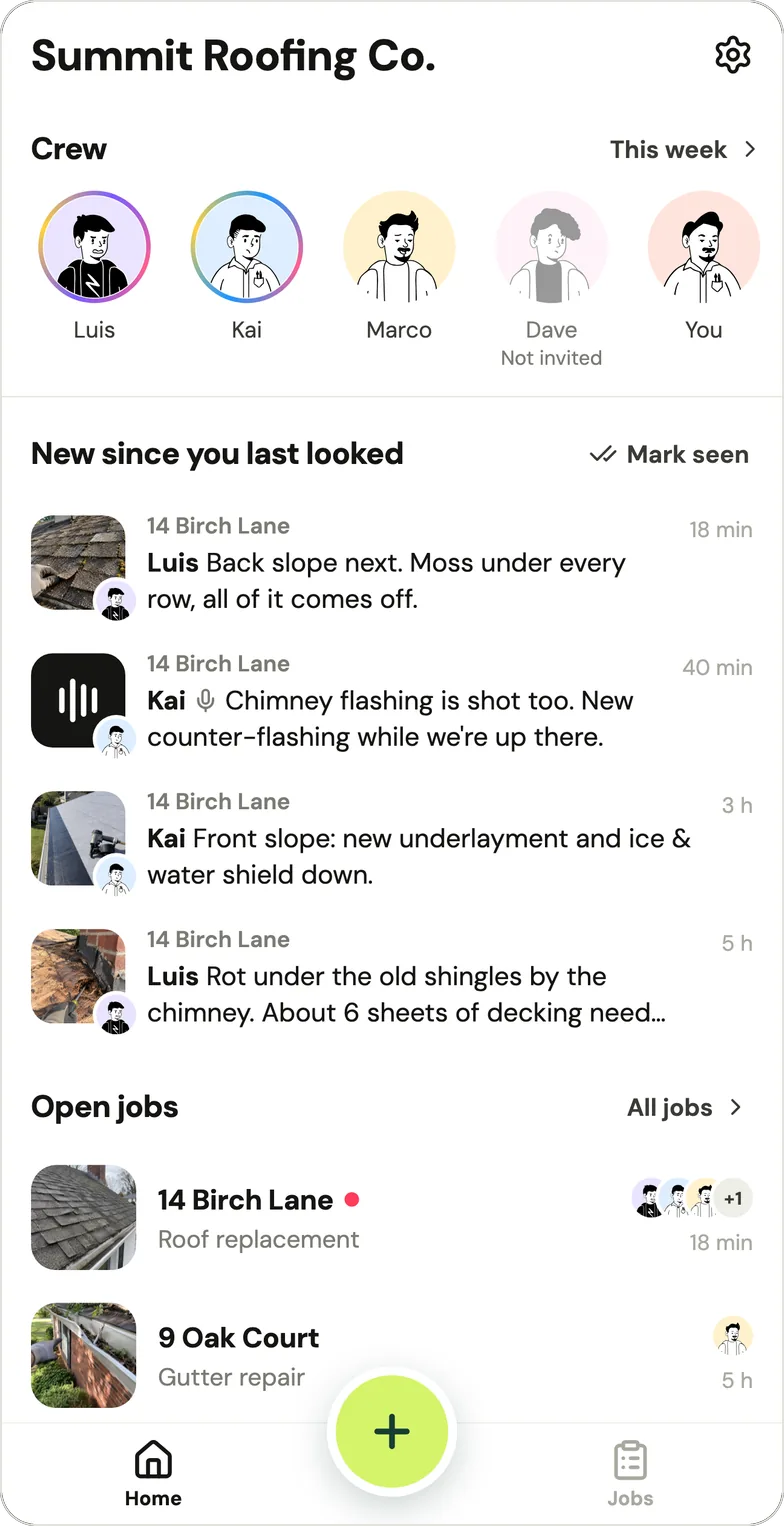
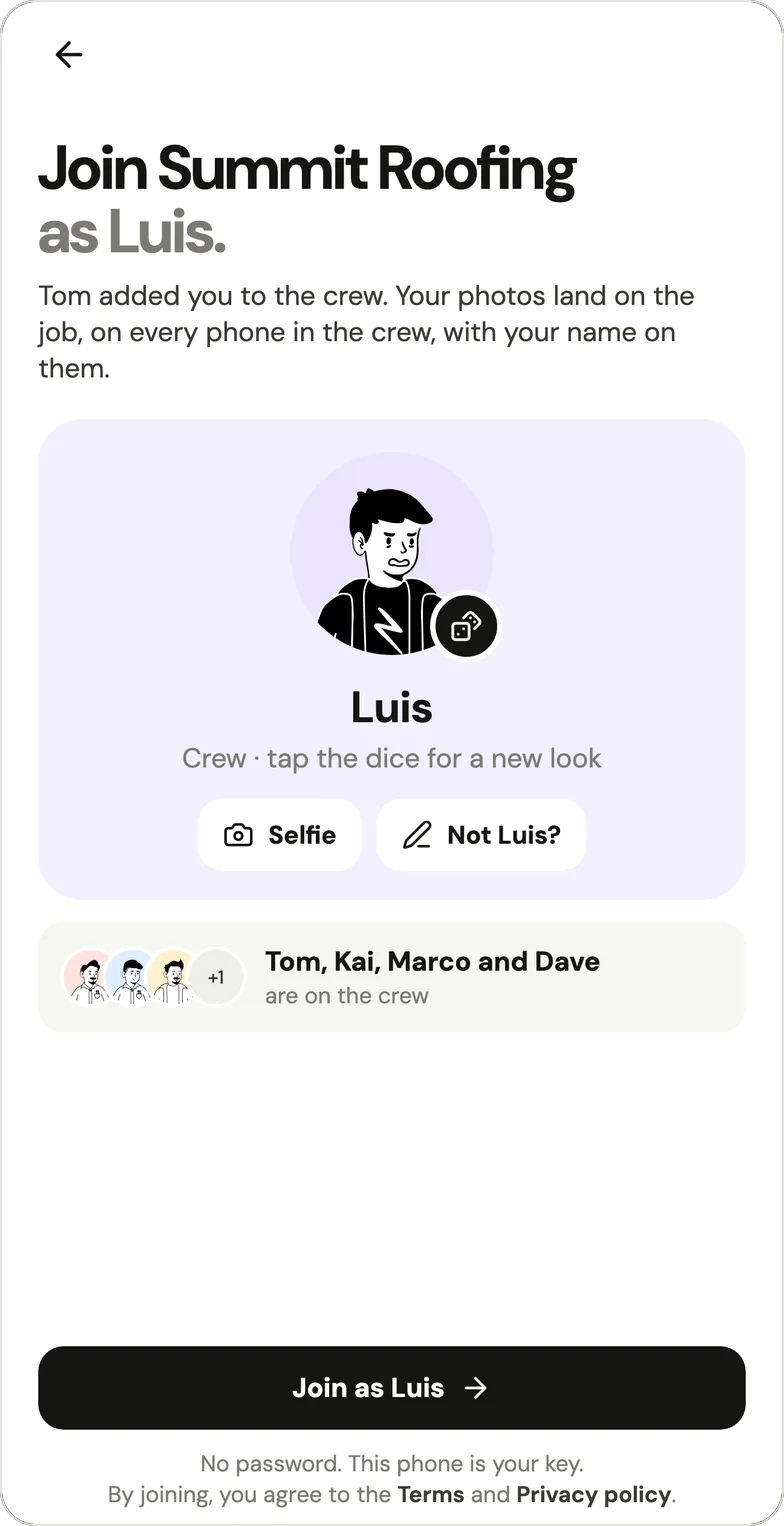
Handle has no web app, no iPad app, no reports beyond that one PDF, and no checklists, search or integrations. It also has no customer link, invoices or time clock. The full comparison with CompanyCam, including moving your photos over, is on Handle vs CompanyCam.
Which tools built for drawings, tasks or the office also hold job photos?
Fieldwire, TaskTag, Connecteam and Jobber aren't job photo apps first, but each comes up as a CompanyCam alternative. As of October 2026 they fit when the real need is drawings (Fieldwire), tasks per project (TaskTag), a time clock and team chat (Connecteam), or scheduling and invoices (Jobber).
Fieldwire: for crews who work from drawings
Fieldwire is construction software built around drawings and tasks, with photos pinned to sheets; CompanyCam is built around a feed of job photos. For a small contractor, Fieldwire fits if you work from plans, and its free Basic tier covers 5 users, 3 projects and 100 sheets (Fieldwire pricing, as of October 2026).
Fieldwire Pro costs $54 a person a month, or $39 billed yearly, and adds reports and exports, sheet compare and templates, with photo metadata stamps from Pro up (as of October 2026): $270 a month for a crew of 5 by our arithmetic. Its real strength is plans: drawings on the web, iPhone and Android with versioning (Fieldwire), and 4.83 stars from 13,904 App Store ratings (October 2026). What it lacks for a roofing or cleaning crew that doesn't work from plans: a layout built around photos rather than sheets and tasks.
TaskTag: tasks, chat and photos per project
TaskTag is a contractor app for tasks, chat and photos per project, and its pricing page leads with "You pay. Your crew joins free." (TaskTag pricing, as of October 2026). It fits a crew that wants tasks and talk in the same place as photos.
The Team plan costs $20 a member a month or $16 billed yearly, with no project cap and 2 TB of storage, and the page says "Crew members join and use TaskTag for free. Always." (as of October 2026). It doesn't say who counts as a paid member and who as a free crew member, so we can't price a crew of 3 or 5; ask TaskTag first. The trial is 30 days with no card. What it lacks: clear crew pricing and a record, with 5.0 stars from 20 App Store ratings (October 2026).
Connecteam: a free time clock and chat for up to 10
Connecteam is a workforce app (a time clock with GPS, job scheduling, forms, tasks, team chat and a company feed) whose Small Business Plan is free for up to 10 users, with an asterisk on "all features" that points to a list (Connecteam pricing, as of October 2026). Past 10 users, its Operations hub starts at $29 a month for the first 30 users billed yearly, or $35 monthly.
It fits a crew whose bigger need is hours and schedules, and it has 4.86 stars from 60,673 App Store ratings (October 2026). What it lacks: a photo log by job; its pricing page lists photos as attachments to chats and shifts.
Jobber: the office side, if that's what you need
Jobber is field-service software for running the office: booking and scheduling jobs, quotes, invoices and online payments (Jobber pricing, as of October 2026). Core costs $49 a month for 1 user, or $29 billed yearly. With the team size set to 2–5 people the page offers Connect at $199 a month with 5 users included ($149 billed yearly), and with 6–10 people, $299 for 10 users.
Jobber is here for owners whose real gap is the office: if scheduling and invoices are what you're missing, start there; its pricing page lists job details and attachments among its features. CompanyCam connects to it: "jobs created in Jobber will create a Project automatically in CompanyCam" (CompanyCam integrations, October 2026). Jobber has a free trial with no card, no free plan, and 4.81 stars from 21,272 App Store ratings (October 2026).
Do you need an app at all, or will a group text and a shared album do?
A group text plus a shared album is a fair CompanyCam alternative for a crew of two or three whose old photos rarely come up: it costs nothing and nobody installs anything. It stops working when photos have to be found by job months later, or when people join and leave.
Owners do run on it. "Pictures. Google drive." was a whole reply on r/pressurewashing in April 2026 to "How do you guys document proof of work?" The limits, as of October 2026:
- iCloud Shared Albums: up to 100 people including the owner. In albums made on iOS 27 or later, photos count toward the owner's iCloud storage; albums made on iOS 26 or earlier hold up to 5,000 photos and videos and shrink photos to 2048 pixels on the long edge (Apple Support).
- Google Photos: up to 20,000 photos or videos per album (Google Photos Help). In a shared album "anyone with access to the album can view the photos and add to the album," and when someone leaves it, "all of the photos, videos, comments, and likes you have added will be removed" (sharing). A Google account's 15 GB is shared with Gmail and Drive (Google One Help).
- Dropbox Basic: free, with 2 GB (Dropbox plans).
What breaks: photos are filed by date, not by job; who took a photo, when and where depends on each phone's settings; and a person who leaves takes their camera roll, or on Google Photos their share of the album. The signs a crew has outgrown it are in group text vs. a job photo app.
What should roofers already on JobNimbus or AccuLynx use for crew photos?
A roofing company already on JobNimbus or AccuLynx should first try the CRM's own app for photos, since the job already lives there: JobNimbus's app takes job photos and draws on them, and AccuLynx's Field and Crew apps upload job photos (their App Store listings, October 2026). Add a photo app only if the crew won't use the CRM's app on the roof.
CompanyCam lists both among its top integrations (CompanyCam integrations, as of October 2026). Handle doesn't connect to either, so its photos won't show up in the CRM. Neither CRM shows a price we could read on October 17, 2026: AccuLynx's pricing page is a quote form, and JobNimbus's didn't load for us.
Also considered: which apps did we leave out, and why?
We left out Solocator, Timestamp Camera, Raken, SafetyCulture, Procore, Buildertrend, Projul and WorkCam, though chatbots and lists name them as CompanyCam alternatives. Solocator and Timestamp Camera are stamp cameras with no shared crew projects; Raken, Procore, Buildertrend and Projul are built for builders and general contractors; SafetyCulture is for inspections; and WorkCam doesn't say whether its price is per person or per team.
- Solocator: a GPS stamp camera ($0.99 in the App Store, October 2026) that saves to your camera roll or cloud storage, with no shared crew projects (solocator.com).
- Timestamp Camera: a watermark camera for date, time and GPS; its App Store listing describes no shared team projects.
- Raken: daily reports, time cards and production tracking for construction; its plans link leads to a Contact Sales page that says "Raken offers custom pricing" (Raken, October 2026).
- SafetyCulture: inspection checklists, free for teams of up to 10, Premium $24 a seat a month billed yearly (SafetyCulture pricing, October 2026). A fit only if inspections are your work.
- Procore, Buildertrend and Projul: construction management for builders and general contractors; more than a small service crew needs.
- WorkCam: keeps work photos out of the personal camera roll and syncs them to the team with a Photo Sync subscription, $5.99 a month or $49.99 a year as an in-app purchase (App Store, October 2026); neither the listing nor its site says whether that's per person or per team, so we couldn't price a crew.
- Smaller names on AlternativeTo (AECify, Filio, CrewBox Pro and others): none came up in owners' threads, search suggestions or chatbot answers.
When should you stay with CompanyCam?
Stay with CompanyCam if your crew relies on several of these at once: live links customers open without an account (Galleries and Timelines), reports and checklists, a web app for the office, iPad, and 50+ integrations including Jobber, JobNimbus, AccuLynx and QuickBooks Online (CompanyCam features, integrations, as of October 2026).
CompanyCam also has the biggest review base of the photo apps here: 4.79 stars from 31,177 App Store ratings, on the App Store since 2015 (October 2026). If price is the only problem, check yearly billing before you switch: a crew of 3 pays $119 a month instead of $149, but annual plans "are non-refundable" (CompanyCam annual policy, as of October 2026). The plans in full: how much CompanyCam costs.
When is Handle not for you?
Handle is not for you if the office works from a computer (there's no web app), or if you need reports, checklists, search, links customers open, integrations, scheduling, invoices or a time clock, none of which Handle has. Another tool on this list covers each of those, as of October 2026.
- An office on a computer: SiteCam, Fieldwire, Connecteam and CompanyCam have a web app, Timemark a web portal, RelayCam and TaskTag a web login.
- Reports: SiteCam, RelayCam, Timemark, Fieldwire (Pro) and CompanyCam. Checklists: RelayCam, Timemark, Fieldwire and CompanyCam.
- Links customers can open: CompanyCam's galleries and live timelines, RelayCam's shareable galleries and reports, Timemark's live project galleries, SiteCam's report links.
- Hours and schedules: Connecteam. Scheduling, quotes and invoices: Jobber.
- Tags and search across thousands of photos: SiteCam and CompanyCam. Integrations: CompanyCam, with 50+.
If none of those fits your crew, Handle is free for your whole crew: no trial, no card, no per-person fees (what free covers).
Questions owners ask
Is there a free CompanyCam alternative?
Yes, several, each with a catch, as of October 2026: SiteCam's free plan allows 3 projects, 500 photos and 25 reports (pricing); Timemark's 100 photos and 3 projects (pricing); TaskTag's 3 active projects and 2 GB (pricing); Fieldwire Basic 5 users, 3 projects and 100 sheets (pricing); and Connecteam is free for up to 10 users but is a time clock and chat app (pricing). Handle, our app, is free for your whole crew: no trial, no card, no per-person fees, on iPhone and Android.
What's the cheapest app like CompanyCam for a crew of 5?
Among paid job photo apps, as of October 2026 and on monthly billing before tax: Timemark Business is $35 a month for 5 people at $7 each (Timemark pricing), RelayCam $89 for up to 5 (RelayCam pricing), SiteCam Pro $145 at $29 each, before a discount for teams of 5+ that SiteCam doesn't size (SiteCam pricing), and CompanyCam $217 (CompanyCam pricing). Fieldwire Basic and Connecteam are free for 5 people, and SiteCam, Timemark and TaskTag have capped free tiers. Handle, our app, is free for your whole crew: no trial, no card, no per-person fees.
Does CompanyCam have a free plan?
No. As of October 2026, CompanyCam offers a 14-day trial with no credit card, then Core at $79 a month for 1 user (2 at most) or Crew at $149 a month for 3 users (CompanyCam pricing). CompanyCam had a free plan until spring 2023: its pricing page still listed a $0 Basic plan for up to 50 projects in March 2023 (archived March 2023), and by May 2023 it was gone (archived May 2023). Plan details: how much CompanyCam costs.
Is Fieldwire free for a small crew?
Partly. As of October 2026, Fieldwire Basic is free for up to 5 users, 3 projects and 100 sheets; reports and exports need Pro at $54 a person a month, or $39 billed yearly (Fieldwire pricing). Fieldwire is built around drawings and tasks, so it fits crews who work from plans better than crews who mainly take job photos.
Which job photo app charges per crew instead of per person?
RelayCam, as of October 2026: $39 a month for up to 2 people, $89 for up to 5 and $224 for up to 15 (RelayCam pricing). CompanyCam's Crew plan includes 3 users for $149 a month, then adds $34 for each extra user (CompanyCam pricing). Jobber, office software rather than a photo app, also prices its team plans by size, from $199 a month for up to 5 users (Jobber pricing). Handle, our app, is free for your whole crew: no trial, no card, no per-person fees.
Can I use Google Photos or iCloud instead of CompanyCam?
Yes, if the crew is small and old photos rarely come up. As of October 2026, a Google Photos album holds up to 20,000 photos or videos (Google Photos Help), and a Google account's 15 GB is shared with Gmail and Drive (Google One Help); an iCloud Shared Album takes up to 100 people including the owner (Apple Support). Neither files photos by job unless you make an album per job by hand.
Is Handle the same as Handle.com?
No. Handle (usehandle.app) is a job photo app for small field crews. Handle.com (construction payments) and Handle by Texada (a CRM) are unrelated companies.
Every photo, on the right job.
Handle is free for your whole crew: no trial, no card, no per-person fees. On iPhone and Android.