Handle vs RelayCam (formerly CrewCam): what a crew pays, and a free RelayCam alternative
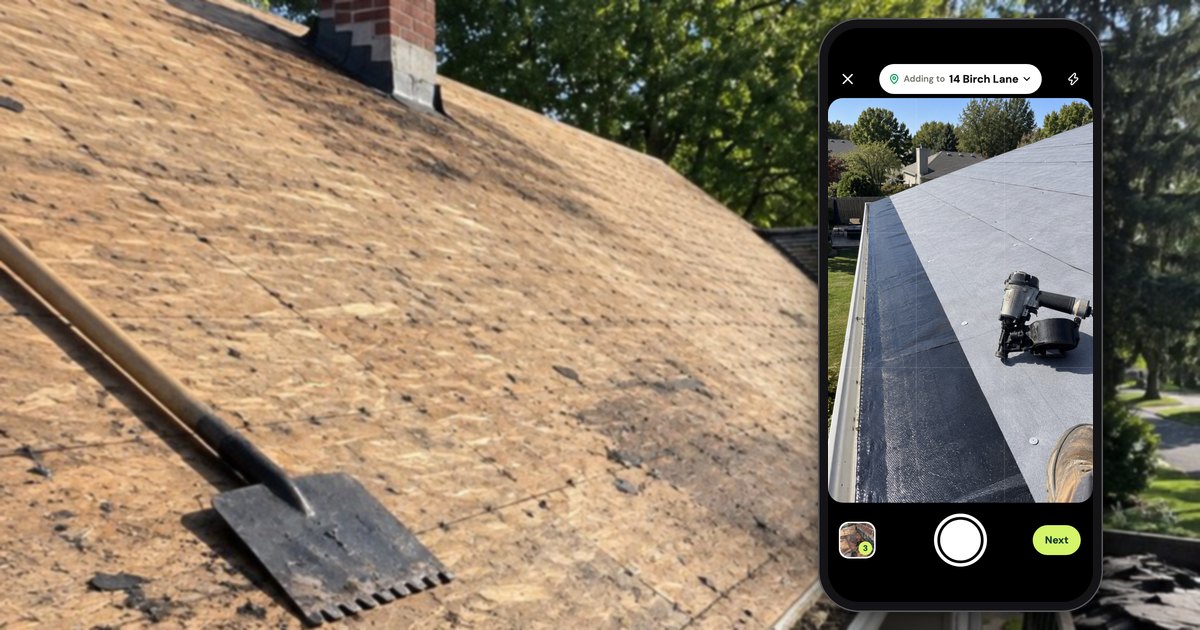
RelayCam, the job photo app formerly called CrewCam, charges by team size, not per person: as of October 2026, $39 a month for up to 2 people, $89 for up to 5 and $224 for up to 15, after a free trial and with no free plan (RelayCam pricing). A free alternative is Handle (usehandle.app, the job photo app; not Handle.com or Handle by Texada), which is free for your whole crew: no trial, no card, no per-person fees. It does less than RelayCam, and the tables below say exactly where.
Is RelayCam the same app as CrewCam?
Yes: RelayCam is the app that used to be called CrewCam. As of October 2026, its App Store seller is still "CrewCam Inc", its Google Play package is still com.crewcam, and crewcamapp.com redirects to relaycam.com. Reviews that call it CrewCam, including several on RelayCam's own App Store listing, are about the same app.
Its privacy policy names the company RelayCam Inc., but the old name is still around: the pricing page offers a "Dedicated CrewCam Contact" on Premium, and the App Store listing sells the plans as "CrewCam Basic Plan", "CrewCam Standard Plan" and so on. None of the RelayCam pages we opened on October 17, 2026 says "formerly CrewCam" in words. If you're looking for the CrewCam login, it is RelayCam's desktop login at web.relaycam.com, with an email or a phone number.
What does RelayCam cost a crew of 1, 3, 5, 6 or 10?
As of October 2026, RelayCam costs $39 a month for up to 2 people, $89 for up to 5 and $224 for up to 15, or $32, $74 and $194 a month billed yearly (RelayCam pricing). The 3rd person moves a crew to $89; past 5, RelayCam's own calculator moves it to $224, though its pricing page says "Add People as You Go" on the $89 plan, with no price.
Handle (our app) is free for your whole crew: no trial, no card, no per-person fees.
From RelayCam's pricing page and its own Plan Pricing Calculator (linked from the footer of relaycam.com), both opened October 17, 2026 (US dollars, before tax; the per-person column is our arithmetic):
| Crew size | Cheapest RelayCam plan | Billed monthly | Billed yearly, per month (pricing page) | Per person, billed monthly | Handle |
|---|---|---|---|---|---|
| 1 person | Basic (up to 2) | $39 | $32 | $39 | Free |
| 2 people | Basic | $39 | $32 | $19.50 | Free |
| 3 people | Standard (Basic stops at 2) | $89 | $74 | $29.67 | Free |
| 5 people | Standard (up to 5) | $89 | $74 | $17.80 | Free |
| 6 people | Premium (no extra seats on Standard in the calculator) | $224 | $194 | $37.33 | Free |
| 10 people | Premium (up to 15) | $224 | $194 | $22.40 | Free |
Where the steps are. The 3rd person moves a crew from Basic at $39 a month to Standard at $89, $50 more. In RelayCam's calculator, the 6th moves it from $89 to Premium at $224, $135 more: the calculator sells extra seats only on Premium and its larger Ultimate plan, at $15 each, and shows no seat field on Standard. Between the steps, people cost nothing extra: a crew of 5 pays what a crew of 3 pays, and a crew of 10 what a crew of 6 pays. Paid month to month for a year, that is $468 for 1–2 people, $1,068 for 3–5 and $2,688 for 6–15.
The 6th person, worked out. Take a roofing crew of 5 on Standard, paying $89 a month. Hire a 6th person and RelayCam's calculator puts the crew on Premium at $224 a month: $135 more a month, or $1,620 more over 12 months of monthly billing, for one person. The pricing page also says "Add People as You Go" on Standard, with no price next to it, so ask RelayCam whether it will sell you a 6th seat on Standard before you hire.
The band counts people, not only the crew on the roof. One App Store reviewer wrote in September 2026 that "we decided to do the paid version to add our salesperson, purchasing manager, and construction manager." Office people who log in take places in the band too.
RelayCam's own pages disagree on a few numbers, all checked October 17, 2026:
- Premium billed yearly is "$194 / month billed annually" on the pricing page, $2,328 a year, but "$2240" a year in the calculator, which bills 10 months for a year.
- An Ultimate plan, $419 a month for up to 30 users, is in the calculator and in the App Store's in-app purchases, but not on the pricing page.
- Inside the iPhone app, the plans are listed at $39.99, $89.99 and $224.99 (App Store listing).
For comparison, CompanyCam's Crew plan costs $149 a month for 3 people and $217 for 5, billed monthly, as of October 2026 (CompanyCam pricing; Handle vs CompanyCam), so for a crew of 3 to 5, RelayCam's flat $89 is the cheaper of the two. In Handle there's no band and no seat to buy: the app shows no plan, and the 6th person joins from a text like the rest of the crew.
Does RelayCam have a free plan?
No. As of October 2026, RelayCam has no free plan: its pricing page offers "Start your free trial now", and its home page says "No credit card required" (RelayCam pricing, home). None of the RelayCam pages we opened says how long the trial lasts, and we found no public help center on relaycam.com.
A crew that wants to pay nothing has three kinds of options, as of October 2026: the capped free tier of another photo app, a group text or shared album that files nothing by job (group text vs. a job photo app), or an app that is free for the whole crew. CompanyCam alternatives for small crews lists the free tiers and their caps.
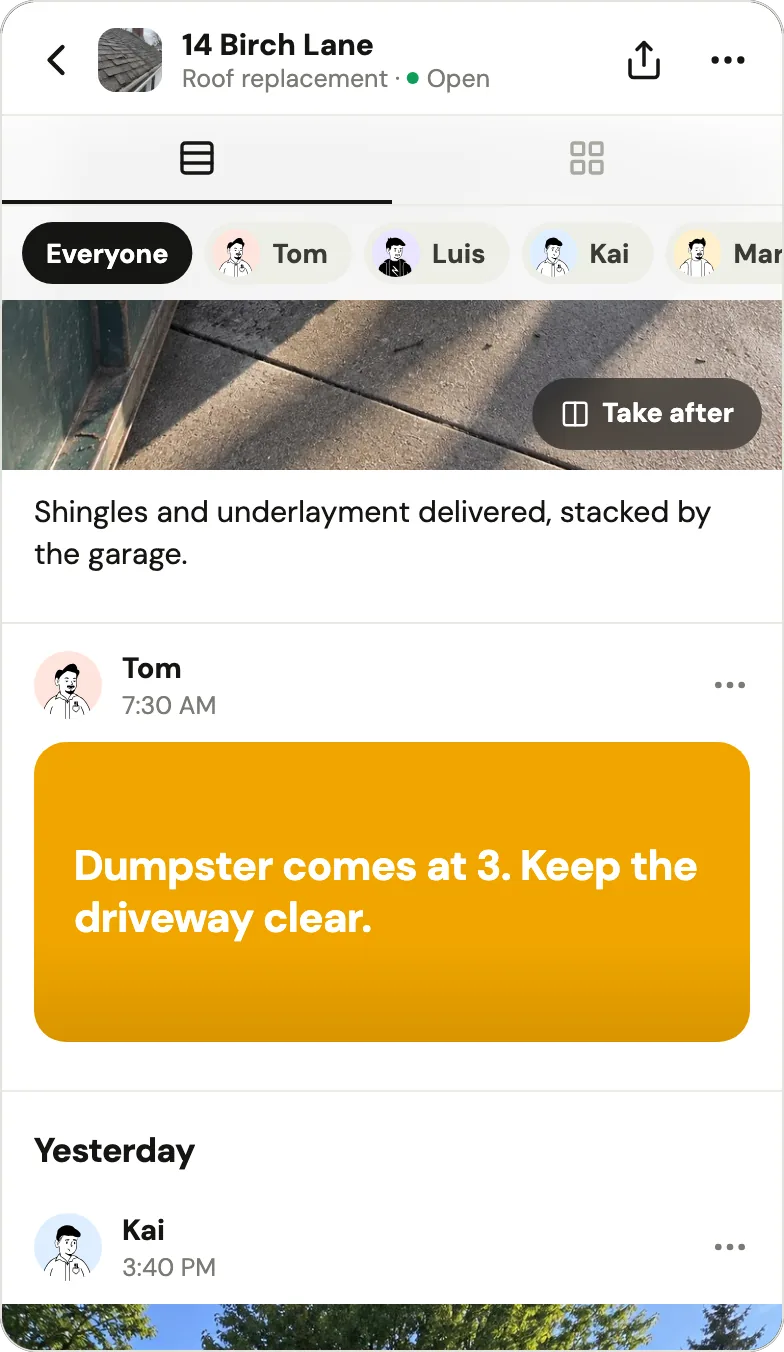
Handle, as an example (it's our app). Handle is a free iPhone and Android app for small field crews: it keeps the crew's job photos, notes and voice notes together, job by job, on every phone in the crew. It is free for your whole crew: no trial, no card, no per-person fees (Is Handle free?). It covers the everyday core: photos on the right job with who took them and when, markup, notes and voice notes, and a stamped photo or a whole-job PDF for the customer. It has no desktop login, checklists, galleries or integrations.
Handle vs RelayCam, feature by feature
As of October 2026, RelayCam and Handle do the same core job for a crew: everyone's photos filed by job, with who took them and when, markup, notes, and proof to send a customer. RelayCam adds a desktop login, an iPad app, checklists, shareable reports and galleries, tags, search and integrations. Handle does the core free, and does a few things differently.
What both apps do
| The job | RelayCam, as of October 2026 | Handle |
|---|---|---|
| Everyone's photos by job | "Organize by Project"; "See real time updates as your team takes photos across projects" | Every photo lands on a job with the face of whoever took it, on every phone in the crew |
| Who and when | "All photos in RelayCam are time and location stamped"; photos "stored by job and by person" | Photo details show who took it and when, and whether the phone was at the job |
| Markup | "Mark Up Photos"; "on-photo drawings, text and feedback" | Draw, Arrow, Circle, Box and Words; the marks sit on top and the photo never changes |
| Words with the photos | "On-Photo Annotations, Notes and Comments" | A word under the photos, a note with a color, a voice note up to 2 minutes |
| A map of jobs | "Project Map View", "See Projects Near Me" | Home can show the open jobs on a map; a job's page has Directions |
| Proof for a customer | "Create Sharable Reports", "Sharable Photo Galleries" | A stamped photo, or the whole job as one PDF, sent from your own phone |
| Phones | iPhone and Android | iPhone and Android |
What RelayCam has and Handle doesn't
| Feature | RelayCam, as of October 2026 | Handle |
|---|---|---|
| Desktop | "You'll have a desktop login as well." | No: iPhone and Android apps only |
| iPad | RelayCam's App Store listing: designed for iPad | No iPad version |
| Checklists and tasks | "Create Checklists", "Custom Tasks", "Assign Users"; tasks can require photos | None |
| Customer and guest access | "Project Guest Access", "Share Projects", "Sharable Photo Galleries" | No customer link: you send a photo or a PDF |
| Reports | "Create Sharable Reports" | One PDF of a job's photos with their times and words |
| Tags and search | "Photo Tags", "Project Tags", "Easy Global Search" | None: you find photos by job or by person |
| Integrations | An API, with ProLine, Buildertrend and Roofr logos; "API Access and Assistance" on Standard | None |
| AI features | AI Walk & Talk and AI CoPilot, in a limited release | None |
| Permissions | Invite crew members and grant them specific permissions | The owner adds and removes people; everyone on the crew sees every job |
The RelayCam columns come from its pricing, features and home pages and its App Store listing, all checked October 17, 2026. RelayCam's pricing page labels its two AI features as not yet generally available, so this page calls them a limited release.
What Handle does differently
| Handle | RelayCam, as of October 2026 | |
|---|---|---|
| Price | Free for your whole crew: no trial, no card, no per-person fees | $39, $89 or $224 a month for up to 2, 5 or 15 people |
| Getting the crew on | The owner texts each person their own link; one tap, no password, no email | "Invite your team with the invite link in app"; the desktop login signs in with email or phone |
| Picking the job | Adding to a job only when Handle is sure; otherwise Which job? before you post | Photos go in projects, with a "See Projects Near Me" view; its pages don't say how a photo is matched to a project |
| While a photo uploads | Saved on the phone first; goes up once there's signal and Handle is open | Photos "stored securely in the cloud", not in the camera roll; an Offline Mode is listed, not described |
| What a sent photo says | The time, who took it and your words; the job's address only when the phone was there | Photos "time and location stamped"; shared as reports, galleries or projects |
When is RelayCam the better choice?
RelayCam is the better choice if the office needs a desktop login, if you run checklists and assign tasks, if customers or subs should open a gallery or a guest link, or if your jobs live in Buildertrend or Roofr. Handle has none of those. As of October 2026, RelayCam's $89 a month covers everyone in a crew of 3 to 5.
- An office at a desk or on an iPad. RelayCam's FAQ says "You'll have a desktop login as well", and the App Store lists its app as designed for iPad. Handle is a phone app only.
- Checklists that ask for photos. RelayCam's home page offers "checklist tasks (and require photos)", with tasks assigned to people.
- Customers or subs who open a gallery. "Sharable Photo Galleries", "Project Guest Access" and shareable reports are listed from the Basic plan up, as of October 2026 (pricing). What Handle sends is a photo or a PDF, and it doesn't change after it's sent.
- Jobs that live in other software. RelayCam's home page shows ProLine, Buildertrend and Roofr logos under "Relay your info with our API's", and Standard includes "API Access and Assistance". We didn't test a sync.
- A person to call. RelayCam's site lists a phone number and offers to book a call or a demo. In the 34 written US App Store reviews of RelayCam that Apple's public feed returned on October 17, 2026 (November 2024 to September 2026), 4 praise its customer service, one of them naming the person who helped.
Plenty of RelayCam users are happy with it. On October 17, 2026 it had 4.7 stars from 41 ratings on the App Store and 3.6 stars from 11 reviews on Google Play. Of the 34 written App Store reviews, 30 give five stars and 20 praise having job photos in one place, off the camera roll; one, from April 2026, says "Left CompanyCam and never looked back." The other 4 complain about bugs, crashes or a feature that stopped working.
Where are the photos while they upload?
Any crew photo app has to hold a photo somewhere until it uploads. As of October 2026, RelayCam's FAQ says photos are "stored securely in the cloud", so "your phone's camera roll and storage aren't used", and RelayCam lists an Offline Mode without describing how it holds photos. Handle saves each photo on the phone first and sends it up once there's signal and Handle is open.
RelayCam's approach has a plus: 3 of its 34 written US App Store reviews praise it for saving space on the phone. Its pricing FAQ and features page don't say where a photo waits while there's no signal, so if your crew works dead spots, ask RelayCam how its Offline Mode holds photos before you rely on it.
In Handle (our app), a photo that hasn't gone up says Waiting for signal, Home says how many are waiting, and each photo keeps the time it was taken. On iPhone, photos wait if you swiped Handle away, and go up when you open it again (help: No signal). The longer comparison, with CompanyCam's offline queue, is on Handle vs CompanyCam.
Who took which photo, where, and on which job?
When a sub bills for work that wasn't done, the answer is a photo with a name, a time and a job on it. As of October 2026, RelayCam stamps every photo with time and location and keeps photos "by job and by person"; Handle (our app) shows who took each photo, when, and whether the phone was at the job.
A RelayCam user on the App Store put the need plainly in May 2026: "We had subs billing for work that wasn't fully done. Now we only approve what's actually documented."
As of October 2026, RelayCam's home page doesn't say how a photo is matched to a project. In Handle, as an example, the photo's job is settled before it's posted:
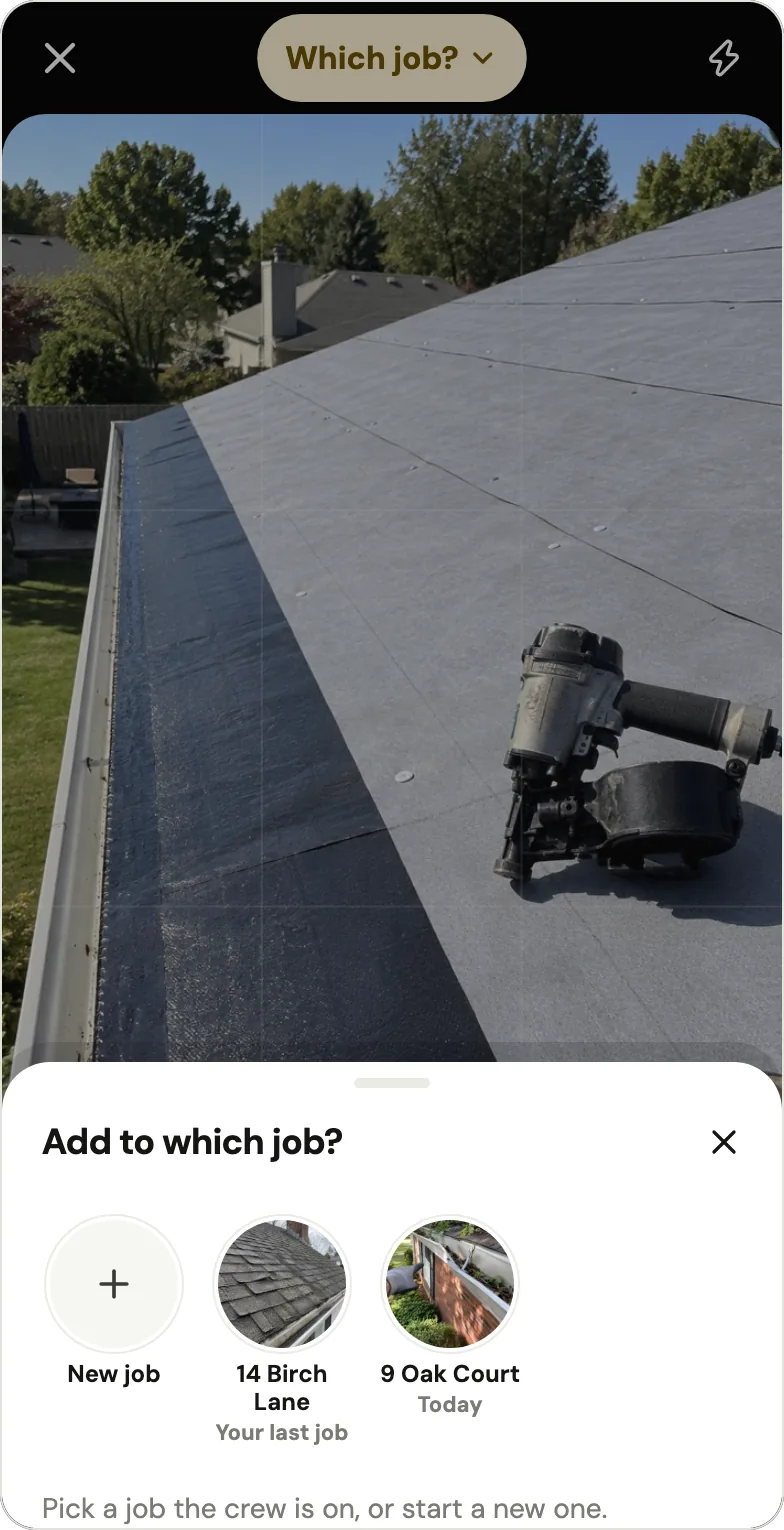
- From a job's page, the camera adds to that job. From Home, the top of the camera says Adding to 14 Birch Lane only when Handle is sure: you're at that job's address, or you just posted to it from the same spot (help: the right job).
- If two open jobs are close together, or Handle isn't sure, it doesn't guess: after the photos it asks Which job?, suggesting your last job and today's jobs.
- If a photo lands on the wrong job anyway, tap ⋯, then Move to another job; the photo keeps its time.
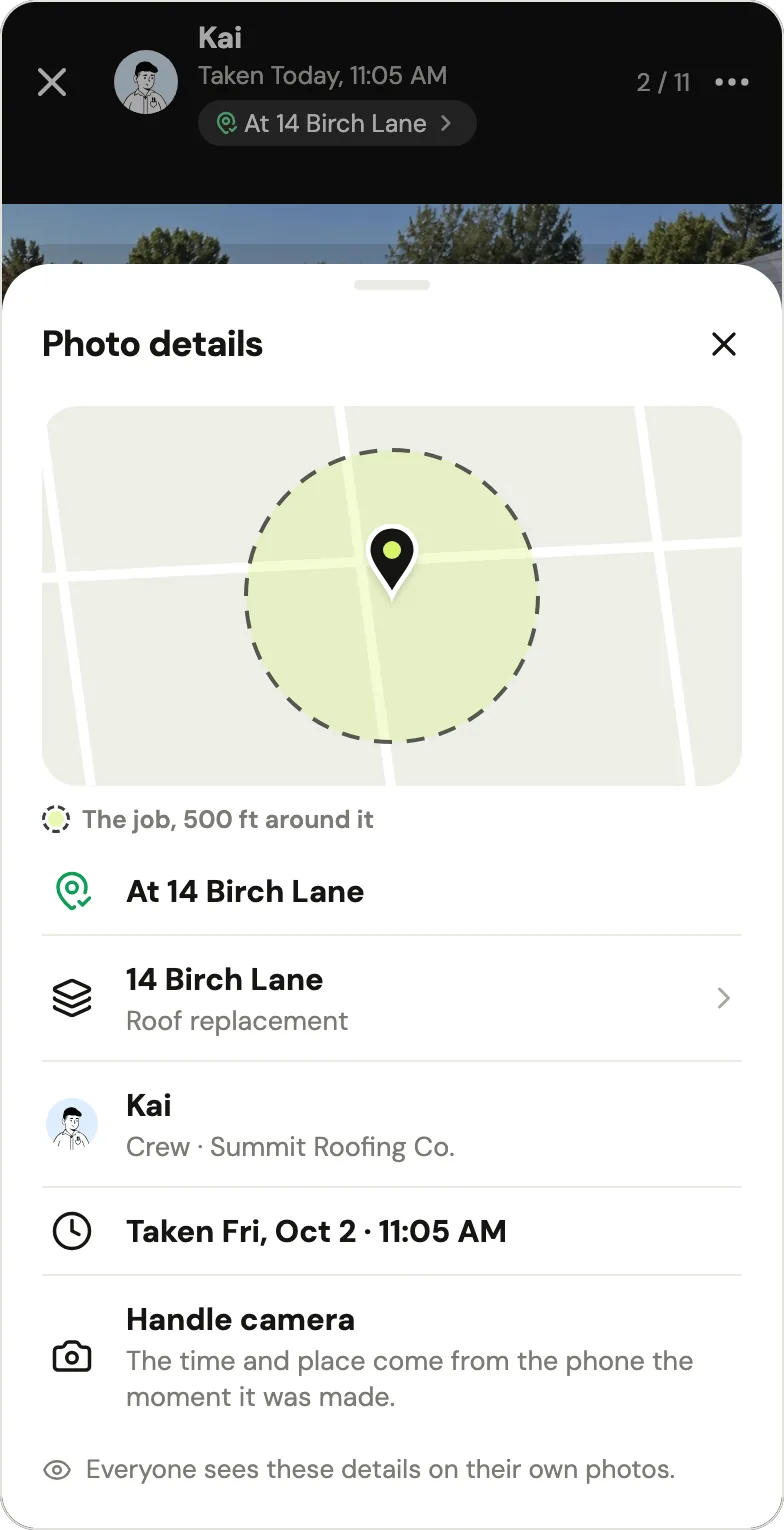
Tap a photo's place line for Photo details: who took it, when, which job, and whether the phone was at the job, by default within 500 feet of it. The time and the place come from the phone at the moment the photo is taken: the time from the phone's own clock, the place from its location fix. Once Handle knows where the job is, it compares that fix with the job's spot (help: photo location). Each person sees these details on their own photos, and the owner sees them on everyone's. Handle saves where the phone is only at the moment of a photo, a voice note or a note, while the app is open, and never in between (help: Does Handle track where I am?).
How do you switch from RelayCam to Handle?
As of October 2026, RelayCam's FAQ says only that "you can download photos/content from the app anytime"; its pages describe no bulk export and no cancellation steps. So switching is by hand: save the photos you still need to your phone, start your crew in Handle, add those photos to Handle jobs up to 10 at a time, then cancel RelayCam where you bought it.
- Save the photos you still need. Download them to your phone from RelayCam's app. For a full copy of every project, ask RelayCam's support before you cancel: its pages don't say what happens to photos when a plan ends, and its privacy policy, as of October 2026, keeps content "for the duration of your account, unless you delete them earlier".
- Start your crew in Handle. Install Handle, tap Start my crew, name the business and sign in with your email and the 6-digit code. Then tap Add after the faces on Home, type each person's first name and text them their link from your own phone (help: How do I add someone?).
- Bring over the jobs you still need. Open the job in Handle, open the camera and, before taking a photo, tap the square to the left of the shutter: it opens your phone's photos. Pick up to 10 at a time. Handle keeps the date stored in each file, when there is one, but not where it was taken; the photos show the name of whoever adds them, and a copy you send says "From the phone's photos".
- Cancel RelayCam where you bought it. On the web if you paid there, or in the App Store or Google Play if you bought inside the app (RelayCam sells its plans as in-app purchases too, per its App Store listing). Time it with your billing date.
| From RelayCam | Moves to Handle? |
|---|---|
| Photos | Yes, by hand, up to 10 at a time, with the date stored in each file |
| Where each photo was taken | No |
| Who took each photo | No; photos show the name of whoever adds them |
| Comments, notes, tags | No; type a word under the photos when you post them |
| Checklists, reports, galleries | No |
| Guest access for customers or subs | No |
Move the open jobs and the ones a customer might still ask about; keep your own copy of the rest. If you leave Handle later, know that it has no bulk export: the owner can send a whole job as one PDF, and anyone on the crew can send photos from a job.
Who Handle fits, and when Handle is not for you
Handle fits one crew, usually 2–10 people on iPhones and Android phones, whose owner wants everyone's photos kept job by job, with no per-person fees as the crew grows. Skip it if you need a desktop or an iPad, checklists, customer galleries or guest links, tags and search, integrations, a time clock, scheduling or invoices.
- An office at a desk or on an iPad. Handle is a phone app with no web or iPad version; RelayCam has both.
- Checklists, guest links and reports. RelayCam lists them from its Basic plan up; Handle sends a photo or one PDF per job.
- Scheduling, quotes, invoices or a time clock. Handle doesn't do these. Run office software such as Jobber or Housecall Pro, or a time clock such as ClockShark, alongside Handle for the photos.
- Several crews and an office manager. Handle is built for one crew whose owner still works the jobs; its App Store description says crews of up to a dozen. A larger company is better served by a paid tool from CompanyCam alternatives for small crews.
If none of those is you, try Handle on a week of jobs before your next RelayCam renewal, or before you hire the 3rd or the 6th person.
Questions owners ask
Is RelayCam the same app as CrewCam?
Yes. RelayCam is the app that used to be called CrewCam: as of October 2026 its App Store seller is still CrewCam Inc, its Google Play package is com.crewcam, and crewcamapp.com redirects to relaycam.com (App Store, Google Play).
Does RelayCam have a free plan?
No. As of October 2026, RelayCam offers a free trial with no credit card, then paid plans from $39 a month for up to 2 people (RelayCam pricing). Its pages don't say how long the trial lasts.
How much is RelayCam for a crew of 5?
As of October 2026, $89 a month on RelayCam's Standard plan, or $74 a month billed yearly, which covers up to 5 people. A crew of 3 pays the same $89 (RelayCam pricing).
What does a 6th person cost on RelayCam?
As of October 2026, RelayCam's own calculator offers extra seats only on Premium and Ultimate, so a 6th person moves a crew from Standard at $89 a month to Premium at $224, which covers up to 15 (calculator, linked from relaycam.com). The pricing page says Add People as You Go on Standard but gives no price, so ask RelayCam first.
Is Handle really free for the whole crew?
Yes: Handle is free for your whole crew: no trial, no card, no per-person fees. Its help center adds: "We may add optional paid tools later. If we do, you'll see the price before you buy, and what you use for free today stays free unless we tell you at least 30 days before." (help: Is Handle free?)
Which phones does Handle work on?
Handle works on iPhone and Android: it's free in the App Store and on Google Play. There is no iPad or web version, so if someone in the office works at a desk or on an iPad, RelayCam, which as of October 2026 has a desktop login and an iPad app, fits better.
Is Handle the same as Handle.com?
No. Handle (usehandle.app) is a job photo app for small field crews. Handle.com is construction lien and payment software, and Handle by Texada is a CRM, both unrelated to this app.
Every photo, on the right job.
Handle is free for your whole crew: no trial, no card, no per-person fees. On iPhone and Android.