Handle vs Timemark: what Timemark's Teamspace costs a crew, and a free Timemark alternative
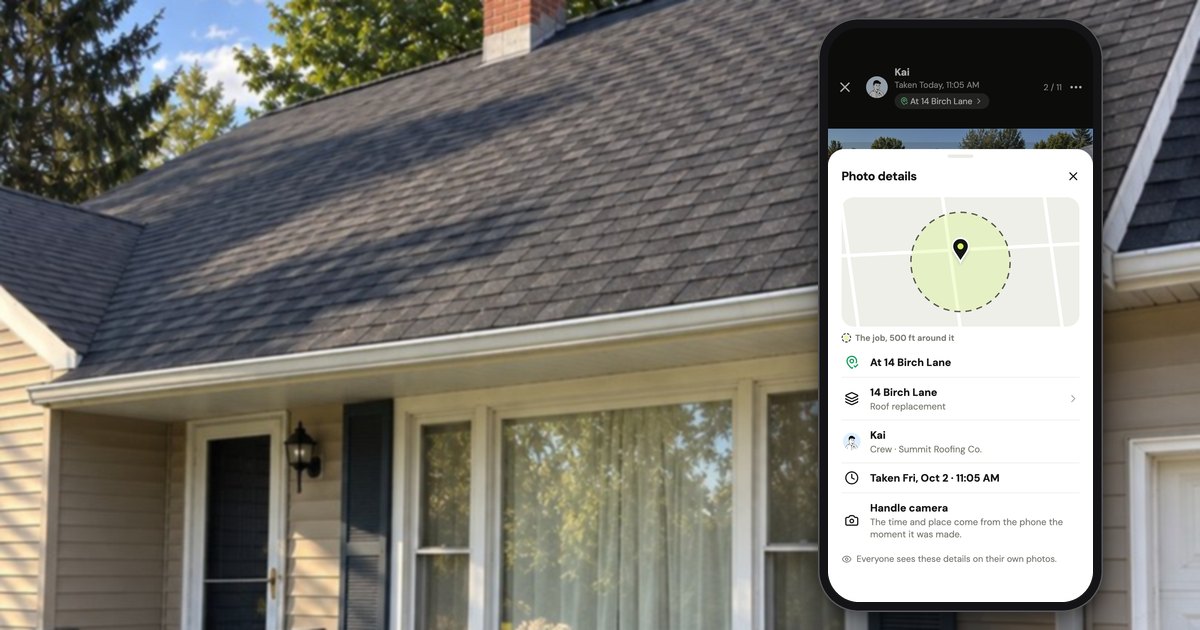
Timemark is a free timestamp camera that burns the time, place and your notes onto each photo, with 10M+ downloads on Google Play as of October 2026; for a crew to share photos it needs a Teamspace, free for 100 photos and 3 projects, or $7 a person a month on Business (Timemark pricing). A free alternative built for crews is Handle (usehandle.app, the job photo app; not Handle.com or Handle by Texada), which is free for your whole crew: no trial, no card, no per-person fees. The two prove different things, and this page says which.
Is Timemark free for a crew?
Partly. As of October 2026, Timemark's app is free for one person, with Timemark's logo on every photo and ads; a crew that wants everyone's photos in one shared place needs a Teamspace, which is free for 100 photos and 3 projects. Past that, the team needs Business at $7 a person a month (Timemark pricing).
The two tracks are easy to mix up. Timemark's help center: "Timemark has two separate plan tracks, and they stack: On the App, for one person: Free or Plus. … In a Teamspace, for the whole team: Free or Business." And: "Buying personal Plus does not change which plan your Teamspace is on" (Plans comparison, updated September 24, 2026). Timemark's plans, at the US prices on its pricing page, as of October 2026:
| Plan (who it's for) | Price | What it gives |
|---|---|---|
| Free, in the app (one person) | $0 | Stamped photos on the phone, with no cap on how many, Timemark's logo in a corner, and ads |
| Free Teamspace (the team) | $0 | 100 photos and 3 projects, shared by the whole team |
| Plus (one person) | $5 a month or $49.99 a year | No watermark, original photos saved, backup to OneDrive and Google Drive; the Teamspace caps stay |
| Business (the team) | $7 a person a month or $60 a person a year | 300,000 photos in the Teamspace, no project cap, team billing, SharePoint and Google Drive |
| Enterprise (several teams) | Through Timemark's sales team | Single sign-on, data residency |
The free app has its own limits, per Timemark's help center as of October 2026: "The Free plan keeps the Timemark logo in a corner of every photo. This is on purpose. It lets anyone who receives the photo confirm it came from Timemark." A clean copy needs Plus or Business, address changes are limited with up to 3 saved places, PDF and link exports are limited, and the App Store listing says it "Contains Advertising".
Timemark's own pages disagree in two places, as checked October 17, 2026:
- A free Teamspace? The pricing page says yes; What is Timemark? lists its cost as "Free trial, then Business plan".
- Reports on Free: "The Free plan does not generate reports" (For solo app users) against "Free accounts include 5 PDF exports" (Export photos to PDF).
What happens past 100 photos, or when you stop paying?
As of October 2026, a free Timemark Teamspace keeps the first 100 photos viewable, blurs newer ones until the team upgrades, and stores free team photos for 12 months by default (blurred photos, data retention). If you stop paying for Business, the team drops to Free and anything over 100 photos and 3 projects becomes read-only: viewable and exportable, but closed to new photos.
The details, from Timemark's help center as of October 2026:
- The blur. "Blur happens on review, not at capture. A blurred photo uploaded successfully. It only unlocks once the plan is active." The oldest 100 stay viewable.
- What counts. Camera-roll uploads count when the team allows them, every 10 seconds of Timemark video counts as 1 photo, and photos imported from CompanyCam past the limit blur too (Import from CompanyCam).
- How long they're kept. Free Teamspace photos: 12 months by default, with an email to the team owner a month before deletion. Business and Enterprise: "no preset expiry; kept while the team exists".
- After you cancel Business. "You stay on Business until the end of your paid period. After that the team drops to Free," and anything over 100 photos and 3 projects "becomes read-only. You can still view, export, and delete. You can't add new photos until you upgrade again or prune below the cap" (Cancel subscription).
A hundred photos goes fast for a crew. For example, if 4 people each take 25 photos on a roof, the free Teamspace is full after the first job.
In Handle (our app) there's no team space to upgrade and no plan to pick: the app shows no plan, and every photo the crew posts goes on its job, on every phone in the crew.
What does Timemark cost a crew of 1, 3, 5 or 10?
As of October 2026, one person can use Timemark's free app with no Teamspace; a shared Teamspace on Business costs $7 a person a month or $60 a person a year at US prices: $21 a month for a crew of 3, $35 for 5 and $70 for 10, by our arithmetic from its pricing page. Every member is a billable seat.
Handle (our app) is free for your whole crew: no trial, no card, no per-person fees.
From Timemark's pricing page, opened October 17, 2026 (US prices, before tax; totals are seats times the listed price):
| Crew size | Free Teamspace | Business, billed monthly | Business, billed yearly | Business month to month for 12 months | Handle |
|---|---|---|---|---|---|
| 1 person, in a Teamspace | $0: 100 photos, 3 projects | $7 | $60 | $84 | Free |
| 3 people | $0: 100 photos, 3 projects for the whole team | $21 | $180 | $252 | Free |
| 5 people | $0: 100 photos, 3 projects for the whole team | $35 | $300 | $420 | Free |
| 10 people | $0: 100 photos, 3 projects for the whole team | $70 | $600 | $840 | Free |
A one-person business doesn't need a Teamspace at all: as of October 2026, Timemark's free app takes as many photos as you like, and Plus ($5 a month) removes the watermark and the ads (Plans comparison).
How Timemark bills a team, from its help center as of October 2026:
- Everyone pays. "There's no per-seat opt-out. Every member you add to a Business team is a billable seat" (Billing cycle); monthly bills are prorated.
- Yearly is prepaid seats. "Removing a member does not refund the seat," and going over without paying means "the team is restricted and newer photos blur" (same page).
- The price depends on your country. The pricing page "shows US prices as the reference. Your actual per-seat amount depends on your country and currency" (Plans comparison).
- The trial. Business has a free trial with no card (home page); Timemark's pages don't say how long it lasts.
For what it does, Business is cheap. A crew of 5 pays $35 a month, about a sixth of CompanyCam's $217 for 5, billed monthly, as of October 2026 (CompanyCam pricing; Handle vs CompanyCam). If your crew needs Timemark's verification or its time clock, that's a fair price.
A stamp burned in, or a stamp written when you send?
There are two ways to put proof on a job photo: burn the time and place into the picture when it's taken, so nobody can change them, or keep the photo clean and write the facts on the copy you send. Timemark does the first and lets anyone check it; Handle does the second, with the phone's time, who took the photo and, when the phone was there, the job's address.
Timemark's stamp. As of October 2026, "Timemark gets the photo time from Timemark's servers, not from your phone's clock. If your phone's clock has been changed, Timemark corrects it automatically," and it "locks the timestamp and GPS location on every photo at the moment of capture" (Why I can't edit the time). Each photo carries "a unique 14-character alphanumeric code", on by default (Photo Code, October 15, 2026). Anyone can check it in the app or at verify.timemark.com, which answers "Authentic", "Fake", "Unable to Verify" or "Not Found"; a photo taken with a mock-location app reads "Virtual location detected" (verification results).
That is a real strength, and Handle doesn't have it.
Handle's stamp, plainly. Handle's photo stays clean on the job. When someone sends it, Handle writes the time, who took it and their words on the copy that goes out, plus At 14 Birch Lane or Near 14 Birch Lane only when the phone was at or near the job (help: send a photo). The time is the one the phone recorded when the photo was taken, not a time from Handle's servers, so if a phone's clock is set wrong, the stamp is wrong too. Every sent copy carries "Taken with usehandle.app" in a corner ("Sent with usehandle.app" for a photo from the phone's photos). Handle never writes "verified", a map or coordinates on a photo, and there's no code or page where someone outside the crew can check one.

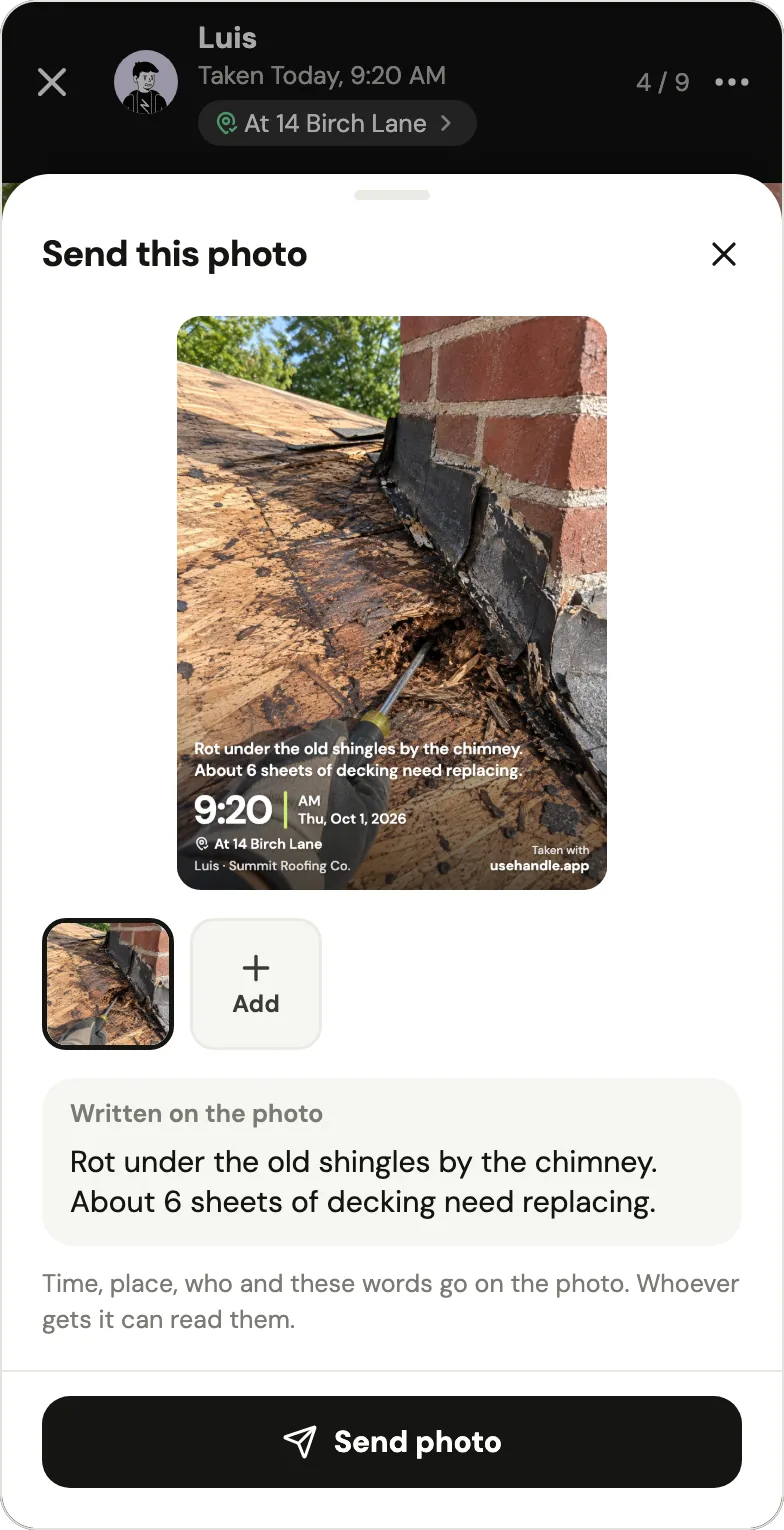
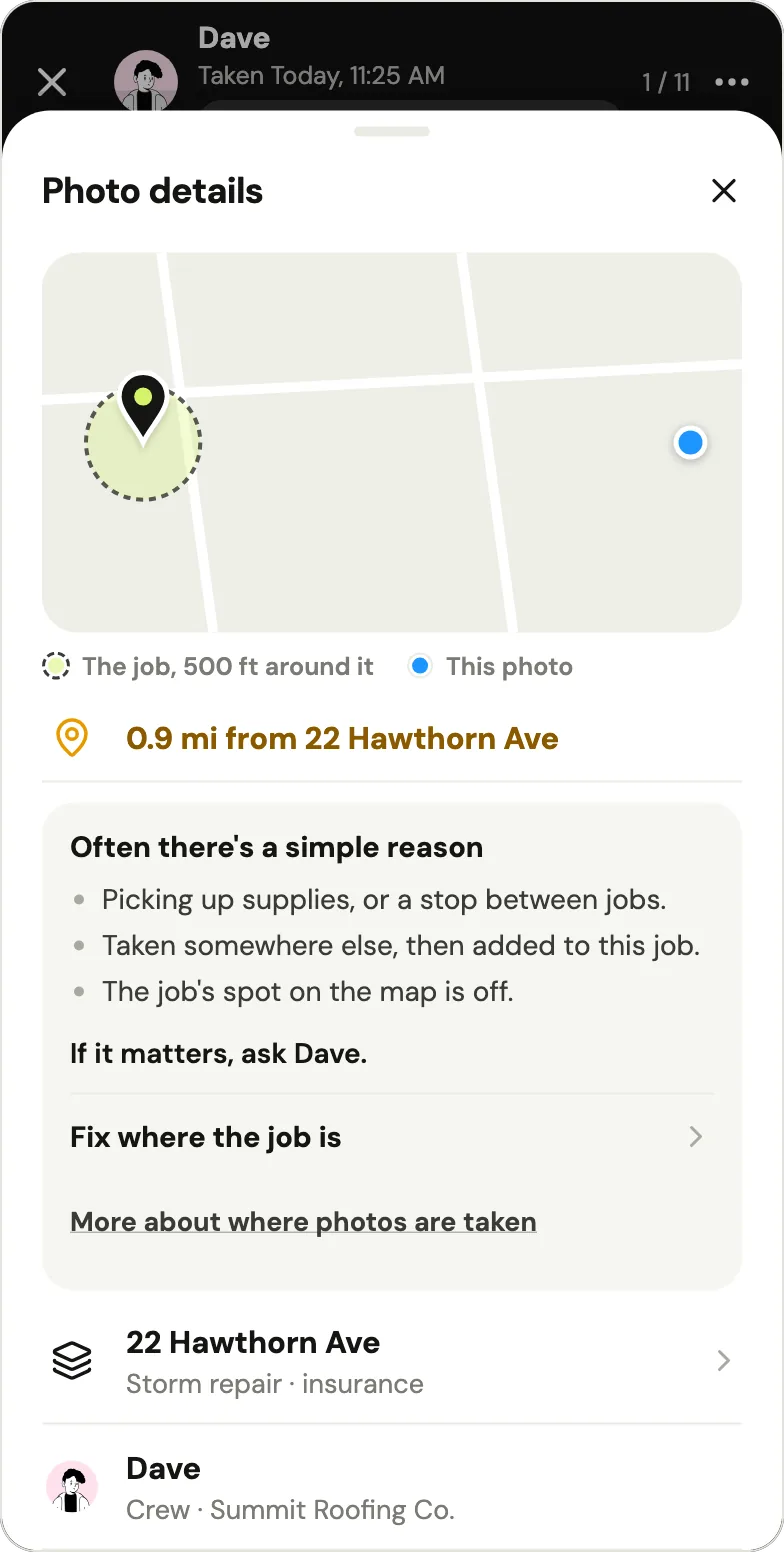
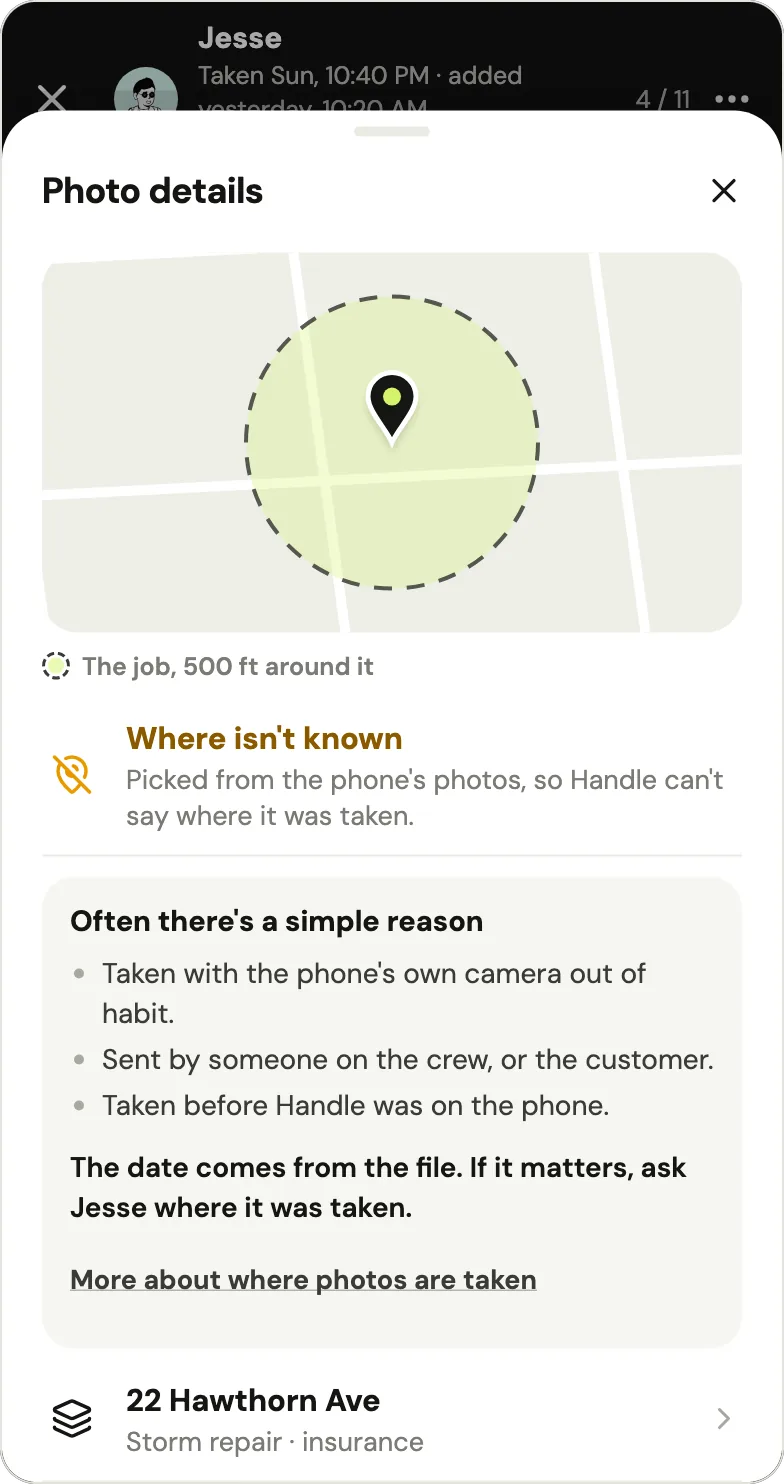
What Handle does compare is the place. The phone reports where it was at the moment of the photo, and once Handle knows where the job is, it compares that with the job's place. When the phone's system says a mock-location app supplied the location, Handle shows "Couldn't confirm location" to the owner and the person who took the photo, and the stamp shows the time only. A photo from the phone's photos says "Where isn't known", and a copy sent to a customer says "From the phone's photos" (help: photo location). If a photo reached Handle more than 10 minutes after the time it gives, Photo details shows when it arrived: a hint, not proof, since a roof with no signal does the same. All of this tells the owner where a crew's photos were taken; none of it is a check that someone outside the crew can run.
Who looks at the photo decides which kind you need. An electrician reviewing Timemark on Google Play in March 2025, in a review 503 people found helpful, wrote: "sometimes other trades will undo, move or even delete some of the work you've done … with this I can prove it was done."
| What you need to show | Who looks | What fits |
|---|---|---|
| That a photo's time and place weren't changed after it was taken | An insurer, an adjuster, a general contractor, another trade | Timemark: server time, a locked stamp, a Photo Code anyone can check |
| The before pictures of a customer's own job, with who took them and when | The customer | Either; Handle sends them free for your whole crew |
| Every crew member's photos on the right job, on every phone | The owner and the crew | Handle, or a Timemark Teamspace (free to 100 photos, then Business) |
| Hours on site | Payroll | Timemark's Clock; Handle has no time clock |
Whether any photo settles a dispute depends on more than its stamp; before and after photos customers trust covers what makes a pair hold up.
Handle vs Timemark, feature by feature
As of October 2026, Timemark and Handle both put everyone's photos in one place with who, when and where, both mark up photos, and both keep shooting with no signal. Timemark adds verification, a time clock, checklists, exports, integrations and an office web portal. Handle keeps the crew's job photos and notes, free for your whole crew, with a stamp written when you send.
What both apps do
| The job | Timemark, as of October 2026 | Handle |
|---|---|---|
| Time and place on a photo | Burned in when it's taken: time, address, GPS and notes; the time can't be turned off | Written on the copy you send: the time, who took it, your words; the job's address only when the phone was there |
| Everyone's photos in one place | Teamspace: "Every photo your crew takes syncs to Teamspace automatically" | Every photo lands on a job, on every phone in the crew |
| No signal | "Capture works offline. Photos sit in the App's upload queue" | Saved on the phone first; goes up once there's signal and Handle is open |
| A person's day | Routes drawn from the places each member's photos were taken; not live | A person's day, job by job; no route line |
| Markup | Arrows, shapes, text and freehand | Draw, Arrow, Circle, Box and Words |
| Phones | iPhone and Android | iPhone and Android |
What Timemark has and Handle doesn't
| Feature | Timemark, as of October 2026 | Handle |
|---|---|---|
| Verification | Time from Timemark's servers; a 14-character Photo Code; checks at verify.timemark.com; mock locations flagged on the photo | None: the stamp uses the phone's time and never says "verified" |
| Time clock | Clock in and out; the hours are stamped onto a photo | None |
| Checklists | Photo, text, number, yes/no, choice and signature steps | None |
| Exports and links | PDF, Excel, ZIP (up to 1,000 photos), KMZ for Google Earth; share links that keep adding a project's new photos | One PDF per job; no customer link; no bulk export |
| Integrations | Jobber, Google Drive, OneDrive, SharePoint, a webhook; import from CompanyCam | None |
| Office web portal | Teamspace on the web | No web app |
What Handle does differently
| Handle | Timemark, as of October 2026 | |
|---|---|---|
| Price for a crew | Free for your whole crew: no trial, no card, no per-person fees | Free Teamspace: 100 photos, 3 projects; Business $7 a person a month or $60 a person a year |
| The photo itself | Clean on the job; the stamp goes on the copy you send | Stamp burned in; a clean copy needs Plus or Business |
| Getting the crew on | Each person gets their own link by text from the owner: it opens on their name, works once and lasts a week | Invite by email, link or SMS; each person signs in with Google, Apple, Microsoft or email |
| The place line | At or Near the job only when the phone was there; away photos show the owner and the photographer the distance | The street address from the phone's location; "A watermark address has to match your real location" |
| Before and after | Take after with the faint before over the camera; one picture to send | A before-and-after collage export on Plus or Business |
| Ads | No ads | Ads in the free app ("Contains Advertising" on the App Store); none on Plus or Business |
The Timemark columns come from its pricing page, its help center and its App Store listing, all checked October 17, 2026.
When is Timemark the better choice?
As of October 2026, Timemark is the better choice if your photos must stand up to someone checking them: it says it takes the time from its servers, locks time and place at capture, and prints a code anyone can verify. It also has a time clock, checklists, exports to Excel and Google Earth, a Jobber link and an office web portal. Handle has none of those.
- Photos someone else will check. Insurers, adjusters, general contractors, or another trade that says you never did the work.
- Hours on the photo. Timemark's Clock stamps clock-in, clock-out, break and work time onto a photo; its checklists can include a signature step.
- Office exports. PDF, Excel, ZIP and KMZ from the web portal, live share links, Jobber and SharePoint.
- One person who only needs a stamp camera. Timemark's free app takes as many photos as you like on the phone, with its logo and ads.
- Crews that work in other languages. Timemark's App Store listing is in English and 20 more.
Timemark is widely used. On October 17, 2026 it had 4.8 stars from 16K ratings on the App Store and 4.7 stars from 966K reviews, with 10M+ downloads, on Google Play. Of the 91 written US App Store reviews in Apple's public feed that day (March 2023 to October 2026), 68 give five stars and 2 mention using it with a team; these counts describe that sample, not Timemark's users.
Is there a free alternative to Timemark for a crew?
Yes, three kinds, as of October 2026: a group text or shared album, which is free but files nothing by job (group text vs. a job photo app); the capped free tier of a photo app, like Timemark's own Teamspace at 100 photos (Timemark pricing; CompanyCam alternatives for small crews lists others); or a crew app that's free for everyone on it, such as Handle, our app.
Handle, as an example (it's our app). Handle is a free iPhone and Android app for small field crews: it keeps the crew's job photos, notes and voice notes together, job by job, on every phone in the crew. It is free for your whole crew: no trial, no card, no per-person fees (Is Handle free?). Where Timemark's free tier gives one person an uncapped stamp camera and a team 100 shared photos, Handle gives the whole crew one place per job, free: every photo lands on the right job with the face of whoever took it, Take after lines up a before and after, anyone on the crew can send a stamped photo, and the owner can send the whole job as one PDF.
Getting the crew on works differently too. In Timemark, the owner invites people by email, a link or SMS, and each person signs in with Google, Apple, Microsoft or email (Join a team, as of October 2026). In Handle, the owner types a first name and texts that person their own link, which opens on their name, works once and lasts a week; they join with one tap, no password and no email (help: How do I add someone?). If the wrong person joins, the owner removes them and sends the right person a new link (help: wrong person).
How do you switch from Timemark to Handle?
Photos you took in Timemark's app without uploading them are already on your phone, so switching is mostly bringing the ones you need into Handle jobs, by hand and up to 10 at a time. Export team photos from the Teamspace first, keep that export for finished jobs, move only the jobs you still need, then cancel Timemark where you bought it.
- Export first. On the free plan, "Photos live in your device's camera roll only" (For solo app users). Team photos export from the Teamspace as a ZIP of "up to 1,000 per export", or as PDF, Excel or KMZ (Who owns your photos, as of October 2026).
- Start your crew in Handle. Install Handle, tap Start my crew, name the business and sign in with your email and the 6-digit code. Then text each person their link from your own phone.
- Add the photos you still need to Handle jobs. Open the job, open the camera and, before taking a photo, tap the square to the left of the shutter to pick from your phone's photos, up to 10 at a time. Timemark's stamp is part of the picture, so it comes along. Handle keeps the date stored in each file, when there is one, but not where it was taken; the photos show the name of whoever adds them, and a copy you send from Handle also gets Handle's own stamp, which says "From the phone's photos".
- Cancel Timemark where you bought it. Plus in the App Store or Google Play; Business as Timemark's Cancel subscription page describes. After the paid period the team drops to Free: anything over 100 photos and 3 projects becomes read-only, and free team photos are kept 12 months by default.
| From Timemark | Moves to Handle? |
|---|---|
| Photos | Yes, by hand, up to 10 at a time, with Timemark's stamp still on them |
| Who took each photo | No; photos show the name of whoever adds them |
| Photo Codes and verification | No: keep your Timemark originals or the ZIP if you may need to verify a photo later |
| Projects and notes | No; type a word under the photos when you post them |
| Checklists, clock records, routes | No |
Who Handle fits, and when Handle is not for you
Handle fits one crew, usually 2–10 people on iPhones and Android phones, whose owner wants everyone's photos kept job by job, on every phone, without a team space to fill up or seats to buy. Skip it if you need photos a third party can verify, a time clock, checklists, exports to Excel or Google Earth, integrations, a web app, scheduling or invoices.
- Proof someone outside will check. Timemark's server time and Photo Code do that; Handle's stamp doesn't claim to.
- Hours, scheduling, quotes or invoices. Handle doesn't do these. Timemark has a time clock and syncs with Jobber; Jobber or Housecall Pro run the office side, and Handle can sit alongside one of them for the photos, without a connection between them.
- An office on a computer or an iPad. Handle is a phone app with no web or iPad version.
- One person and a stamp. If nobody else needs to see your photos, Timemark's free app may be all you need.
If none of those is you, try Handle on a week of jobs before your Teamspace reaches 100 photos.
Questions owners ask
Is Timemark free?
For one person, yes: as of October 2026 Timemark's app is free, with its logo on every photo and ads. A crew's shared Teamspace is free for 100 photos and 3 projects; past that, Business costs $7 a person a month or $60 a person a year in the US (Timemark pricing).
What happens when a free Timemark Teamspace passes 100 photos?
As of October 2026, the first 100 photos stay viewable and newer ones blur until the team upgrades to Business; they still upload. Free team photos are stored for 12 months by default, with an email to the team owner a month before deletion (blurred photos, data retention).
How much is Timemark Business for 5 people?
$35 a month, or $300 a year, at the US prices on Timemark's pricing page as of October 2026 ($7 a person a month or $60 a person a year). Timemark sets the actual price by country, and every member is a billable seat (Timemark pricing).
Can you change the time on a Timemark photo?
No. Timemark says it takes the photo time from its own servers, not the phone's clock, and "locks the timestamp and GPS location on every photo at the moment of capture"; anyone can check a photo's 14-character Photo Code in the app or at verify.timemark.com (Timemark help, Photo Code, as of October 2026).
Is Handle really free for the whole crew?
Yes: Handle is free for your whole crew: no trial, no card, no per-person fees, on iPhone and Android (App Store, Google Play). Its help center adds: "We may add optional paid tools later. If we do, you'll see the price before you buy, and what you use for free today stays free unless we tell you at least 30 days before." (help: Is Handle free?)
Does Handle put the time and place on photos?
On the copy you send, yes: Handle writes the time, who took the photo and your words, plus the job's address only when the phone was at or near the job (help: send a photo). The time is the phone's, Handle never writes "verified" on a photo, and there's no code anyone outside the crew can check.
Is Handle the same as Handle.com?
No. Handle (usehandle.app) is a job photo app for small field crews. Handle.com is construction lien and payment software, and Handle by Texada is a CRM, both unrelated to this app.
Every photo, on the right job.
Handle is free for your whole crew: no trial, no card, no per-person fees. On iPhone and Android.